

Executive Overview
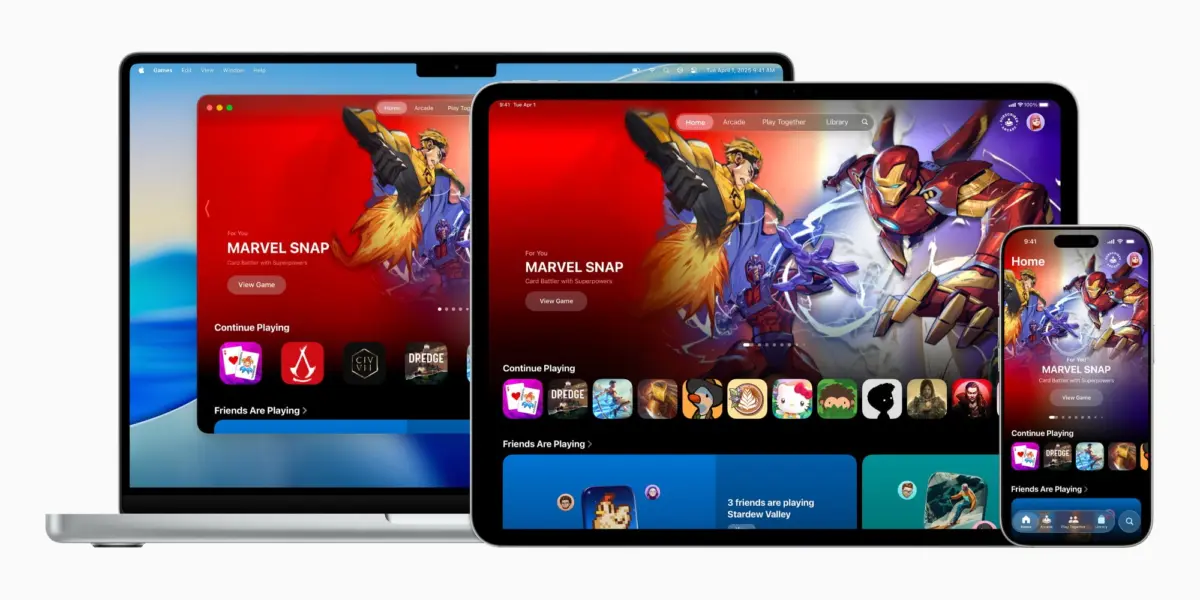
The arrival of iOS 26 has quietly altered the landscape of mobile entertainment. Among the headline features and system-wide design changes, Apple introduced two completely new native applications to the iPhone home screen. Chief among them is Apple Games, a dedicated hub designed to unify, organize, and elevate the gaming experience across Apple’s ecosystem.
For years, the iPhone has reigned as one of the most ubiquitous gaming platforms on earth. From casual puzzle games and match-three time-killers to console-grade, high-budget AAA titles running on modern Apple Silicon, the App Store has evolved into a powerhouse. Yet, until now, gaming has lived a fragmented existence. Titles were scattered across home screens, tucked away in folders, or managed through legacy interfaces like the long-neglected Game Center.
Apple Games changes this dynamic entirely. Described by Apple as a "personalized home for games and playing with friends," the app acts as a centralized dashboard. Whether utilized on an iPhone, an iPad, or a Mac, the application bridges the gap between casual play and social competition. Following its initial rollout, subsequent software iterations—most notably iOS 26.2—have further refined the app, introducing deep library-management tools and full controller navigation support.
This report provides an exhaustive analysis of the Apple Games app, exploring its structural design, feature set, ecosystem integration, and the strategic positioning it occupies within Apple’s broader software and subscription ecosystem.
Detailed Chronology: From Concept to Ecosystem Staple
To understand the weight of the Apple Games app, it is necessary to trace how Apple’s relationship with gaming has evolved over the decades.
The Pre-Hub Era: Fragmented Play
When the App Store launched in 2008 alongside iPhone OS 2, it instantly democratized mobile gaming. Developers large and small flooded the platform, turning the pocket-sized device into a portable arcade. However, management tools for players remained rudimentary. Game Center, introduced in iOS 4, attempted to bring social leaderboards and achievements to iOS, but it largely operated as a background service rather than a consumer-facing hub.
Over the years, Apple made several strategic adjustments. The launch of Apple Arcade in 2019 provided a curated subscription service offering ad-free, premium games. Yet, discovering and managing these titles still required navigating the sprawling, commerce-heavy App Store interface. Users lacked a singular, distraction-free space dedicated solely to their interactive entertainment.
The iOS 26 Announcement and Rollout
Rumors of a dedicated gaming app had circulated within developer circles for months prior to its official unveiling. When Apple took the stage at its annual developer conference to preview iOS 26, the introduction of the Apple Games app marked a major philosophical shift. Apple was no longer treating games as merely another category of "apps" in the software store; it was acknowledging gaming as a primary pillar of the modern iOS experience.
The iOS 26.2 Refinement Phase
Apple did not stop at the initial release. Recognizing early user feedback, the Cupertino giant deployed targeted updates in iOS 26.2, transforming the app from a simple dashboard into a robust power-user tool. These updates addressed key pain points, particularly around library organization and hardware accessibility, cementing the app’s utility for dedicated gamers who utilize physical controllers.
Anatomy of the App: Inside the Five Core Sections
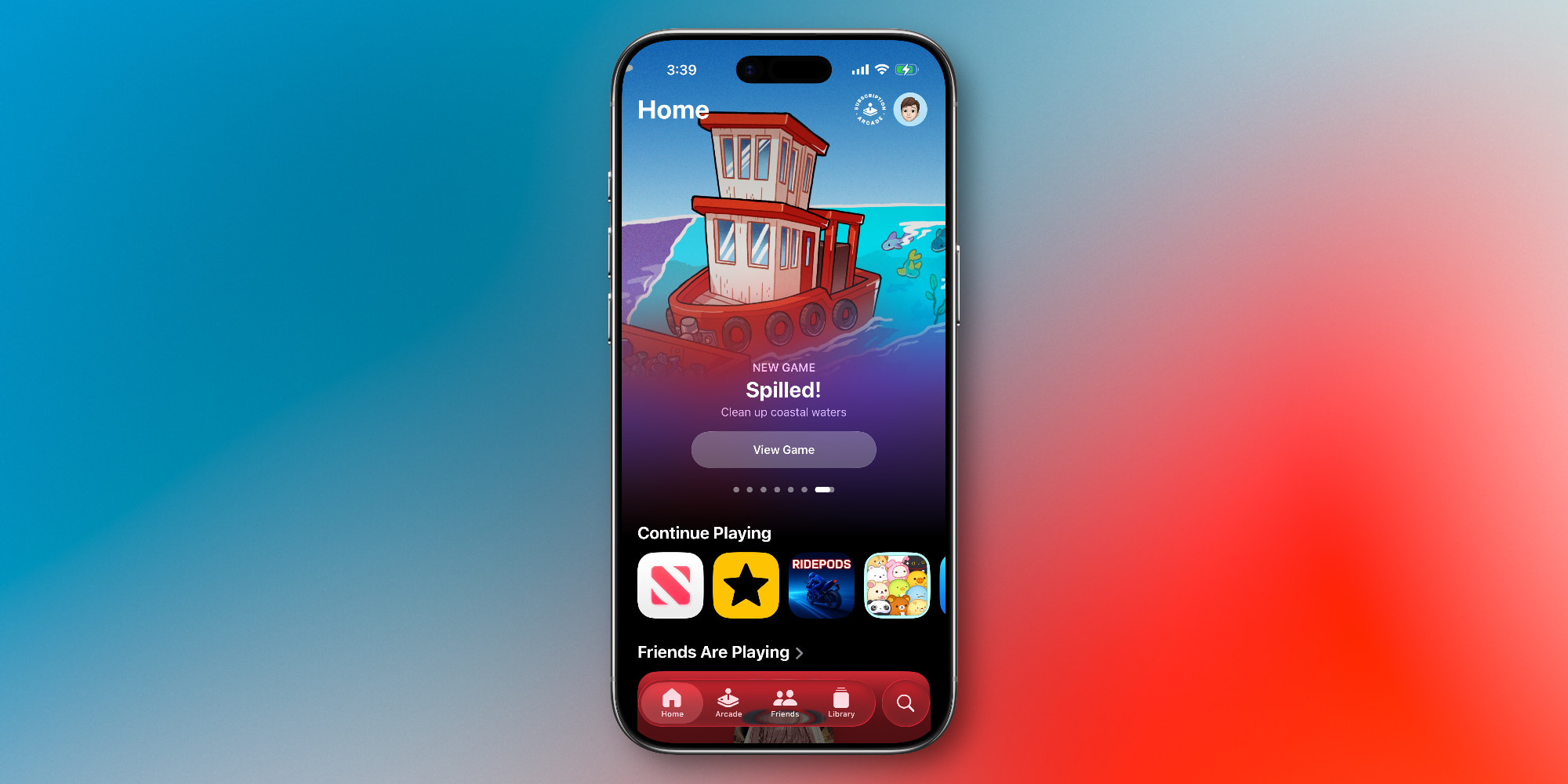
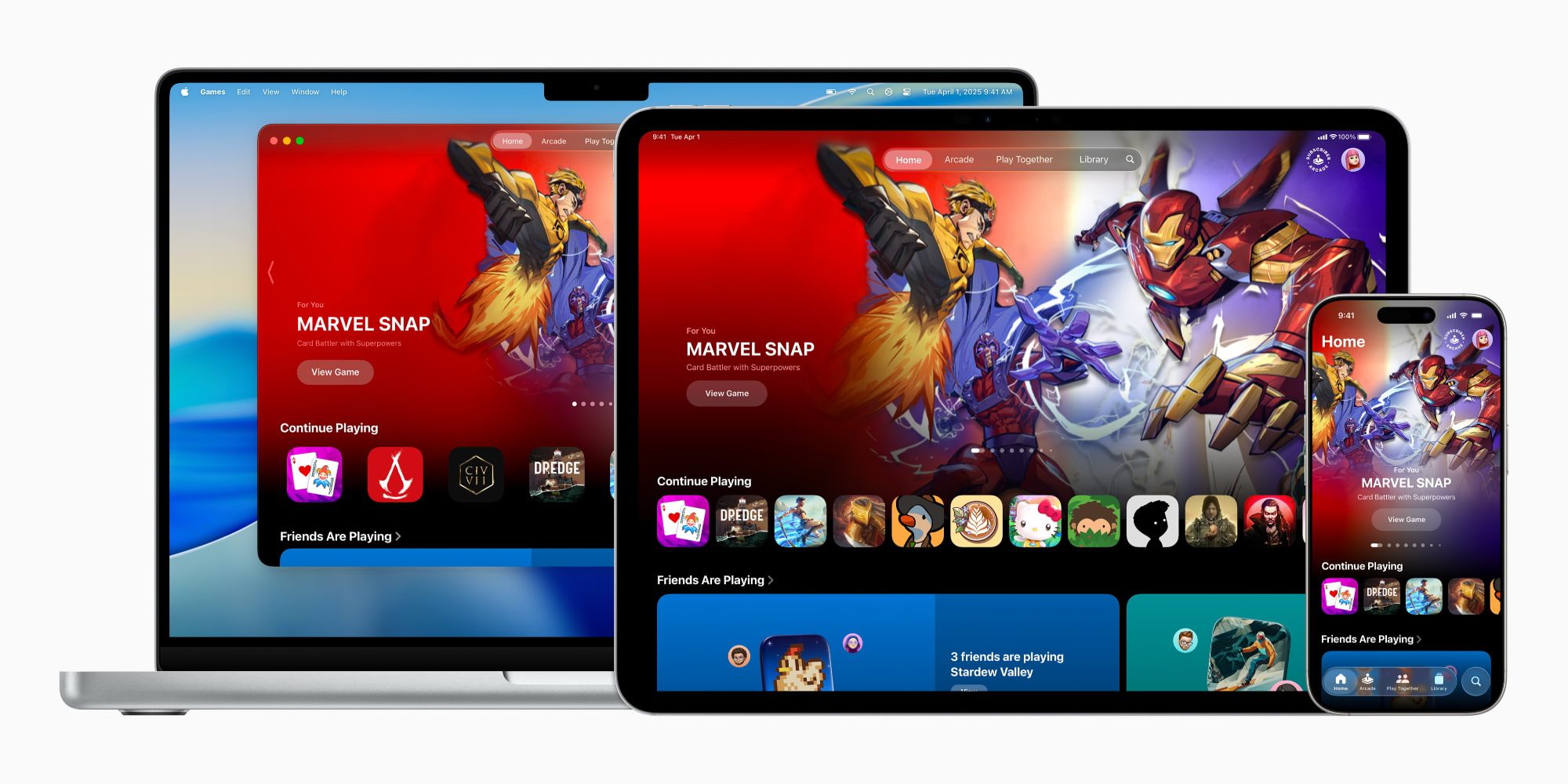
Opening the Apple Games app in iOS 26 immediately reveals a clean, content-forward interface that draws heavily from established Apple design languages found in Apple Music, Apple TV, and Apple Podcasts. The app is organized into five distinct, easily accessible tabs located at the bottom of the screen:
1. The Home Tab: Your Personalized Gaming Dashboard
If you have ever used the Apple TV app to resume a movie or television show, the Home tab in Apple Games will feel instantly intuitive. It serves as the command center for your interactive life.
- Continue Playing: A prominent row displays the games you have most recently engaged with, allowing you to dive straight back into the action without hunting through home screen pages.
- Curated Recommendations: Apple utilizes personalized algorithms and editorial curation to suggest new titles tailored to your play history and preferences.
- Social Pulse: A quick snapshot highlights what your friends have been playing recently, encouraging organic social engagement.
2. The Arcade Tab: Curated Premium Gaming
Dedicated entirely to Apple Arcade, this tab acts as a gateway to the subscription service. For a flat monthly fee (or as part of an Apple One subscription tier), users gain unlimited access to a growing catalog of over 200 games completely free of ads, paywalls, and in-app purchases. The Arcade tab simplifies discovery within this walled garden, highlighting new releases, developer spotlights, and exclusive titles that cannot be found anywhere else on mobile.
3. The Friends Tab: Social Play and Challenges
Gaming has always been fundamentally social, and the Friends tab revitalizes the legacy Game Center framework.
- Activity Overview: Users can view their friends’ real-time gaming activity, status updates, and recent achievements.
- Direct Challenges: The tab streamlines the process of initiating multiplayer sessions, sending direct challenges, and comparing high scores across shared titles.
4. The Library Tab: Granular Organization
For power users with dozens of games installed, the Library tab is arguably the most valuable asset in the application. Originally functional at launch, it received massive upgrades in iOS 26.2.
- Advanced Filtering: Users can sort their installed software using granular criteria, making massive libraries manageable.
- Achievements & Events: The library interface aggregates in-game achievements, unlocked trophies, and upcoming live-service events or seasonal updates for the games you own, keeping you informed without needing to open each individual app.
5. The Search Tab: Discovery Beyond the Algorithm
While algorithmic recommendations are helpful, the Search tab provides deliberate discovery tools. Beyond traditional text queries, it allows users to browse by curated gaming categories, including:
- Multiplayer
- Action
- Family
- Puzzle
- Music
- Strategy, RPG, and more.
Supporting Context & Metrics: Hardware Integration and iOS 26.2 Enhancements
A software hub is only as good as the hardware and system-level support that backs it. In iOS 26.2, Apple addressed one of the most requested quality-of-life features for serious mobile and tablet gamers: comprehensive hardware controller navigation.
Bridging Touch and Hardware Inputs
Historically, navigating iOS menus required touch input, even if the user was actively holding a PlayStation, Xbox, or MFi-certified Bluetooth controller connected to their iPhone, iPad, or Mac. This forced an awkward, immersion-breaking dance between physical buttons and the device screen.
As of iOS 26.2, the Apple Games app offers full, native support for controller-based navigation. Players can scroll through their libraries, browse the store, accept friend challenges, and launch titles entirely through their controllers. This change aligns the iPhone and iPad experience closer to dedicated consoles like the Nintendo Switch, PlayStation 5, or Xbox Series X.
Ecosystem Synergy: iPhone, iPad, and Mac
Apple Games is not restricted to the iPhone. Because it spans across iOS, iPadOS, and macOS, user data, achievements, and library preferences synchronize seamlessly via iCloud. A user can check friend challenges on their iPhone during a morning commute, continue a game on their iPad during lunch, and finish a session on their Mac in the evening—all while maintaining a unified profile.
Official Statements and Industry Perspective
When introducing the concept, Apple positioned the app as a celebration of the community surrounding interactive entertainment. In the official press release accompanying the initial rollout, Apple executives emphasized that the application was built to solve a specific problem of scale:

"The App Store is home to the world’s best mobile games, enjoyed by hundreds of millions of people every single day. With the Apple Games app, we are creating a dedicated, personalized home where players can easily find their next favorite game, track their achievements, and connect with friends in meaningful ways across all their devices."
Industry analysts have largely viewed the move as a calculated strategic step. By carving out a dedicated ecosystem for gaming, Apple is signaling to AAA developers—such as Capcom, Kojima Productions, and Ubisoft, all of whom have brought heavy-hitting titles to Apple Silicon—that the ecosystem is mature enough to warrant dedicated platform-level infrastructure.
Future Outlook: What Lies Ahead for Apple Games?
As iOS 26 continues its lifecycle, the Apple Games app stands as a strong foundation with significant room for growth. While casual users may find that basic game launching can still be achieved directly from the home screen, the app’s true value proposition lies in its social connectivity, filtering tools for large libraries, and hardware integration.
Looking forward, industry observers anticipate that Apple may leverage this hub to introduce further ecosystem enhancements, potentially including:
- Cloud-saved state integration expansions across more third-party titles.
- Enhanced streaming or remote-play capabilities tied to Mac and iPad hardware.
- Deeper tournament integration for competitive mobile esports communities.
Ultimately, the success of the Apple Games app will depend on how deeply third-party developers choose to integrate Game Center APIs and how aggressively players adopt social gaming challenges. For now, Apple has successfully delivered a long-overdue home for mobile entertainment—one that respects both the casual match-three player and the hardcore controller-wielding gamer alike.









Belum ada komentar. Jadilah yang pertama berkomentar!