Apple’s ongoing crusade to cement the Mac as a legitimate, high-performance destination for AAA gaming has been a fascinating exercise in persistence. Despite heavy investments in custom silicon architecture, dedicated software toolkits, and high-profile developer outreach programs, the Mac has historically struggled to capture the hearts and minds of core gamers. The barriers are well-documented: a platform historically dominated by productivity applications, architectural discrepancies with traditional Windows-based DirectX pipelines, and the perpetual challenge of thermal and power management in sleek, fanless or thin-chassis form factors.
However, with the unveiling of Metal 4 at Apple’s Worldwide Developers Conference (WWDC25), Cupertino is taking its most pragmatic and technologically sophisticated leap forward yet. Rather than attempting to brute-force performance through sheer hardware might, Apple is focusing on intelligent software architecture. Metal 4 introduces two critical capabilities to the MetalFX graphics pipeline—frame interpolation and real-time denoising—that directly address the heaviest performance bottlenecks associated with modern, high-fidelity rendering.
By empowering developers to synthesize intermediate frames and clean up resource-intensive ray-tracing passes natively within the upscaling pipeline, Apple is providing studios with the exact tools needed to deliver fluid, visually stunning experiences without overwhelming the GPU. Spanning support from the M-series chips down to the A14 Bionic, Metal 4 represents a watershed moment for Apple’s graphics framework. This in-depth report explores the mechanics of these new features, their implications for developers and players alike, and what this means for the future of gaming across Apple’s vast hardware ecosystem.
Detailed Chronology: The Evolution of Mac Gaming and the Path to Metal 4
To truly understand the gravity of Metal 4, one must trace the evolutionary arc of Apple’s graphics API and its historical approach to gaming.
The Pre-Metal Era and the Transition to Custom Silicon
For decades, Mac gaming existed in a sort of twilight zone. Developers relied on OpenGL—an aging, cross-platform standard that Apple eventually deprecated—or ported games using cumbersome wrappers like Cider. Performance was routinely compromised, thermal throttling was rampant on Intel-based MacBooks, and dedicated GPUs were often restricted to high-end, prohibitively expensive configuration tiers.
The paradigm shifted fundamentally in 2014 with the introduction of Metal, Apple’s proprietary low-overhead graphics and compute API. Designed to act as a thin layer between the application and the underlying GPU, Metal was built to minimize CPU overhead and give developers direct, granular control over hardware resources. While Metal successfully modernized iOS gaming, its adoption on macOS was initially slow, as the industry remained firmly entrenched in Microsoft’s DirectX ecosystem.
The introduction of Apple Silicon (beginning with the M1 chip in late 2020) changed the hardware equation overnight. By combining a unified memory architecture (UMA) with high-efficiency CPU and GPU cores on a single system-on-a-chip (SoC), Apple created a platform capable of impressive graphical output while maintaining remarkable power efficiency. Recognizing this potential, Apple introduced the Game Porting Toolkit at WWDC23, giving developers a direct environment to evaluate how smoothly their existing Windows games could run on Apple Silicon.
The Rise of MetalFX Upscaling
As developers began experimenting with high-end titles on Apple Silicon, it became immediately clear that native resolution rendering at high refresh rates would push thermals and battery life to their limits. Enter MetalFX Upscaling, Apple’s answer to NVIDIA’s DLSS and AMD’s FSR.
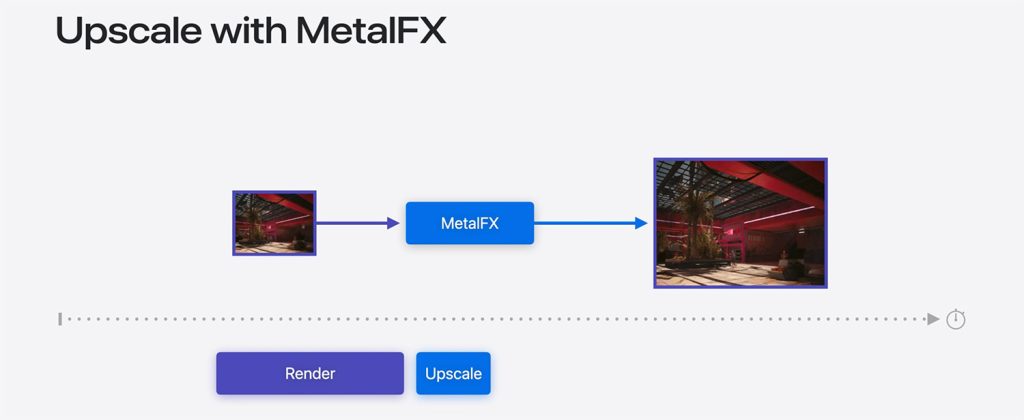
Introduced in earlier iterations of the Metal framework, MetalFX allowed applications to render scenes at a lower native resolution before upscaling them to the display’s native resolution using spatial and temporal algorithms. As Apple engineers outlined, rendering high-resolution images consumes the GPU for significant periods. By offloading the heavy lifting of pixel reconstruction to MetalFX, games could drastically reduce per-frame render times, freeing up thermal headroom and computational cycles to keep frame rates stable.
While MetalFX upscaling quickly became the baseline for performance-conscious game development on macOS, the gaming landscape continued to shift. Technologies like ray tracing—which simulates the physical behavior of light to achieve hyper-realistic reflections, shadows, and global illumination—became standard expectations for AAA titles. Simultaneously, gamers began demanding ultra-high refresh rates (90Hz, 120Hz, and beyond) to match modern ProMotion displays.
This brings us to WWDC25 and Metal 4, where Apple has introduced the next logical evolution of its graphics architecture: bridging the gap between high-fidelity lighting and fluid motion through frame interpolation and denoising.
Supporting Context & Metrics: Decoding Metal 4’s Core Technologies
To appreciate how Metal 4 changes the game, one must examine the mechanics of its two headline features: Frame Interpolation and Ray Tracing Denoising. Both technologies are built directly on top of the established MetalFX upscaling pipeline, creating a unified ecosystem for rendering optimization.
[Traditional Rendering Pipeline]
Raw Game Engine -> Heavy GPU Workload -> High Resolution Output (Performance Costly)

[Metal 4 Optimized Pipeline]
Raw Game Engine (Low Res / Few Rays) -> MetalFX Upscaling -> Denoising (Clean Lighting) -> Frame Interpolation -> High Refresh Rate Output (Power Efficient)
1. Frame Interpolation: Squeezing Extra Fluidity Out of Every Cycle
If you are familiar with modern PC gaming or, conversely, skeptical of the motion smoothing settings found on modern high-definition televisions, you already understand the foundational concept of frame interpolation.
Traditionally, a GPU must render every single frame displayed on your screen from scratch. In a fast-paced action game running at 60 frames per second (fps), the GPU performs this complex geometric and pixel-shading calculation 60 times every second. When developers attempt to push for 120Hz displays, that workload essentially doubles, often forcing compromises in visual fidelity, resolution, or ray-tracing complexity.
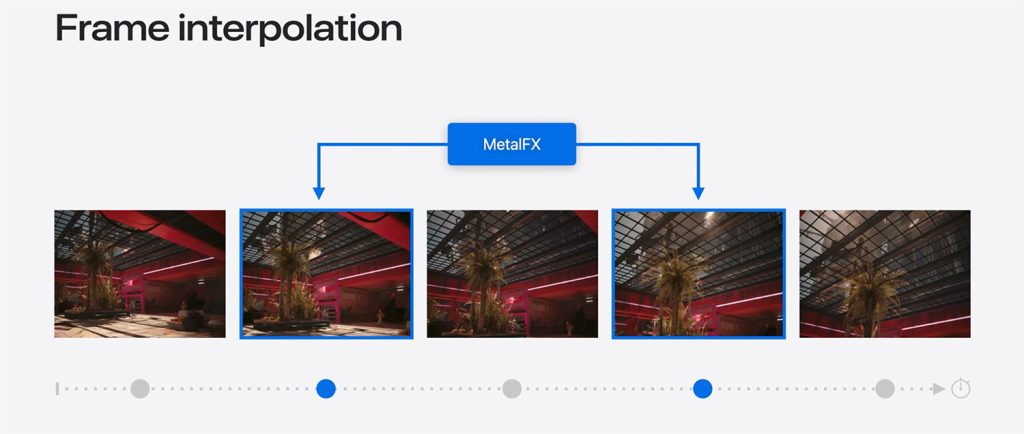
Frame interpolation changes this dynamic by refusing to render every frame from the ground up. Instead, the system analyzes motion vectors and depth data generated by the game engine. By understanding how objects, characters, and cameras are moving across the screen from one real frame to the next, the MetalFX pipeline mathematically calculates and synthesizes intermediate frames to insert in between them.
For Players: The perceptual result is dramatically smoother animation and a higher perceived frame rate. A game running at a native 30 or 60 fps can be interpolated to feel like a silky-smooth 60 or 120 fps experience, drastically reducing motion blur and stutter.
For Developers: It provides an efficient bridge to target high-refresh-rate displays (such as the 120Hz ProMotion screens found on modern MacBook Pro and iPad Pro models) without forcing them to double their raw rendering workload or sacrifice graphical settings.
2. Ray Tracing Denoising: Making Realistic Lighting Feasible
Ray tracing has spent the last several years establishing itself as the gold standard for visual fidelity in PC and console gaming. By tracing the path of light rays as they interact with virtual environments, games can produce stunning, physically accurate reflections, refractive water surfaces, and soft shadows.
However, ray tracing is notoriously demanding. Casting millions of rays per frame places an immense burden on hardware. If a developer attempts to improve performance by reducing the number of rays cast per pixel, the resulting image becomes heavily compromised by "noise"—a grainy, speckled visual artifact that flickers distractingly in motion. Historically, cleaning up this noise required developers to write complex, proprietary denoising algorithms or dedicate significant CPU resources to post-processing cleanup.
Metal 4 addresses this pain point directly by integrating denoising into the MetalFX pipeline.
The Workflow: Games can now deliberately render scenes using significantly fewer rays—drastically reducing the initial GPU performance penalty—and then hand the noisy, speckled output over to MetalFX.
The Result: During the upscaling process, the pipeline automatically cleanses and denoises the image, delivering a crisp, stable, and visually pristine result.
The Developer Advantage: Studios no longer need to reinvent the wheel by developing custom denoising shaders for macOS. The framework handles the heavy lifting natively, lowering the barrier to entry for porting ray-traced PC games to Apple Silicon.
Official Technical Insights and Developer Integration
Apple’s rollout of Metal 4 at WWDC25 was accompanied by deep-dive technical sessions designed to demystify the API updates for software engineers. According to Apple’s engineering teams, the integration philosophy behind Metal 4 centers on reducing friction.
"This year, MetalFX adds support for frame interpolation. Your app can use it to generate intermediate frames in much less time than it would take to render each frame from scratch. You can use those intermediate frames to achieve even higher frame rates."
— Apple WWDC25 Engineering Presentation
Furthermore, Apple has ensured broad hardware compatibility to maximize developer adoption. Metal 4 is designed to scale across a massive installed base of devices. The framework will natively support:
Apple Silicon Macs: All machines equipped with the M1 chip and later.
iOS and iPadOS Devices: All hardware powered by the A14 Bionic chip and later.
This wide compatibility window is crucial. By ensuring that Metal 4 features are not locked exclusively to the newest M4 or M5 processors, Apple is incentivizing developers to build features that can scale gracefully across everything from an entry-level iPad Air to a top-tier Mac Studio.
For developers eager to implement these tools, Apple has highlighted two essential sessions from the WWDC25 developer catalog:
Discover Metal 4: An introductory session breaking down the core architectural additions, API changes, and performance optimization strategies.
Go further with Metal 4 games: A deep-dive workshop focusing on advanced implementation of MetalFX upscaling, motion vector analysis for frame interpolation, and integration of ray tracing denoising.
Future Outlook: Can Metal 4 Finally Turn the Tide for Mac Gaming?
As we look toward the horizon of the consumer technology market, the question remains: Will Metal 4 be the catalyst that finally transforms the Mac into a mainstream gaming platform?
Skeptics will rightly point out that software APIs, no matter how advanced, are only half the battle. The historical inertia of the Windows/DirectX duopoly remains formidable. Game publishers operate on strict return-on-investment (ROI) calculations; porting a massive AAA title requires time, capital, and dedicated QA resources. If the player base on macOS does not actively purchase and engage with these titles, publishers will remain hesitant to commit resources, regardless of how easy Apple makes the porting process via tools like the Game Porting Toolkit and Metal 4.
At the same time, the macroeconomic and technological winds are undeniably shifting in Apple’s favor:
Unified Silicon Architecture: The ubiquity of Apple Silicon across iPads, MacBooks, iMacs, and desktop Macs means that a game optimized for Metal 4 on a Mac Studio can theoretically scale down to run on an iPad Pro with minimal friction. This multi-platform reach significantly expands the potential addressable market for developers.
Hardware Efficiency: In an era where power consumption and thermal management are paramount—particularly in the laptop space, where the vast majority of Mac users compute—Apple’s ability to deliver high frame rates and complex lighting without melting the chassis or draining the battery in 45 minutes is a massive competitive advantage.
Maturing Toolsets: With each successive generation of the Metal framework, Apple has closed feature parity gaps with DirectX 12 and Vulkan. Ray tracing, variable rate shading, mesh shaders, and now advanced upscaling, denoising, and frame interpolation mean that developers no longer have to compromise their artistic vision when bringing a game to macOS.
Metal 4 is not a magical silver bullet that will instantly convert millions of hardcore PC gamers overnight. However, it is an exceptionally pragmatic, engineering-first solution to the technical hurdles that have plagued Mac gaming for generations. By giving developers the sophisticated rendering shortcuts they need to deliver high frame rates and gorgeous lighting without burning through hardware resources, Apple has laid the technical groundwork for a much brighter gaming future on the Mac.
Whether major publishers seize this opportunity to populate the Mac App Store with the industry’s biggest blockbusters will depend on the consumer market’s response in the months and years to come. One thing is certain: the tools are finally ready.












Belum ada komentar. Jadilah yang pertama berkomentar!