

Executive Overview
The release of iOS has consistently redefined mobile software integration, but the introduction of the dedicated "Apple Games" app marks a monumental structural shift in how Cupertino treats interactive entertainment. Long relegated to a decentralized ecosystem spread across the App Store, Game Center backgrounds, and scattered folders, mobile gaming finally has a unified, first-party home.
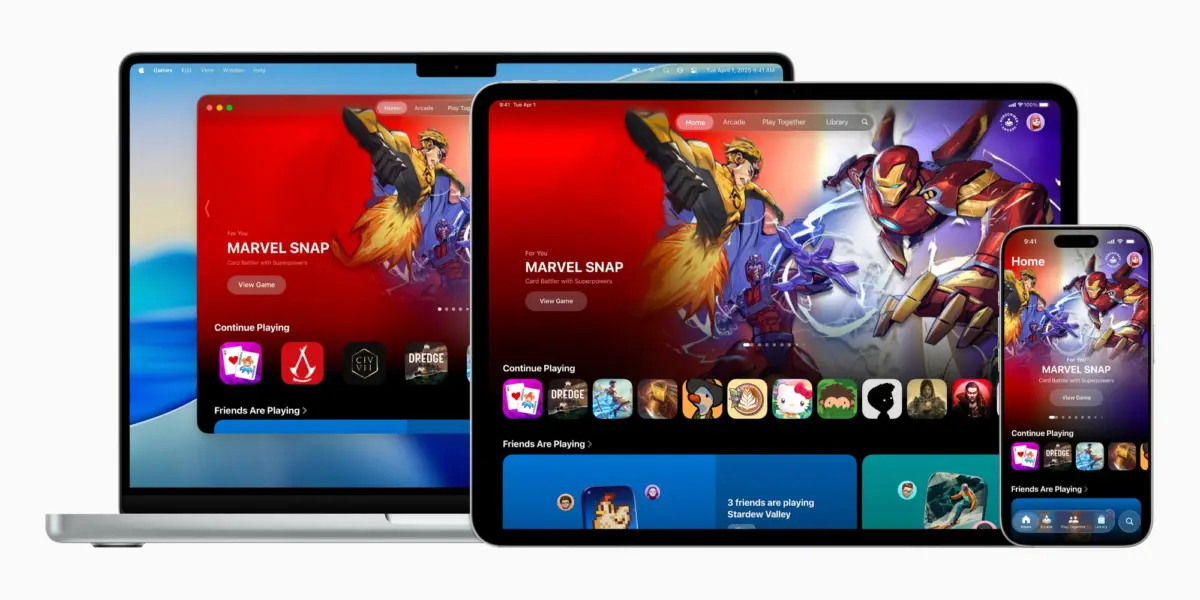
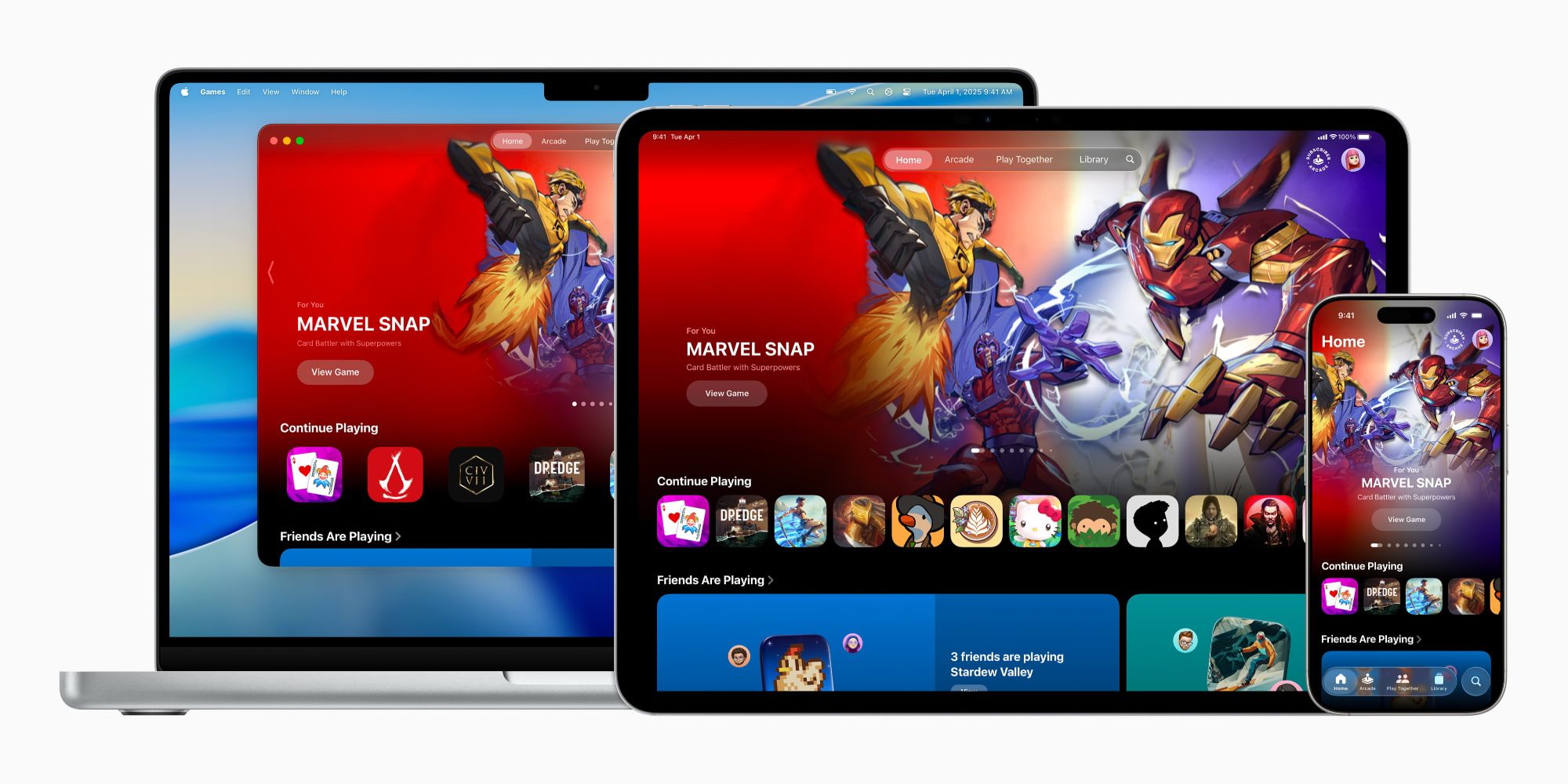
Designed to bridge the gap between casual players diving into match-three puzzles and hardcore enthusiasts rendering high-fidelity, AAA console-caliber titles on modern silicon, Apple Games serves as a centralized hub for discovery, library management, and social engagement. Available across iPhone, iPad, and Mac, the application synthesizes various gaming threads into a single interface.
With subsequent iterations like iOS 26.2, Apple has refined the platform, adding robust filtering tools, native game controller navigation, and deeper social hooks. This article provides an exhaustive examination of the Apple Games app, exploring its architectural features, the strategic rationale behind its deployment, its user interface design, and what this centralized paradigm shift means for the future of the digital entertainment market.
Detailed Chronology
To fully understand the arrival of the Apple Games app, one must trace the historical evolution of Apple’s software support for gaming.
The Pre-Hub Era: Decentralized Entertainment
For over a decade and a half, the App Store acted as both the storefront and the de facto launcher for iOS gaming. While exceptionally lucrative—transforming the iPhone into the world’s most ubiquitous gaming platform—it lacked a dedicated environment tailored specifically to players. Game Center operated quietly in the background as a utility for achievements and turn-based matchmaking, while Apple Arcade, introduced in 2019, lived as a distinct tab buried within the App Store itself.
Users who amassed large libraries of games faced cluttered home screens or deep folders, lacking a unified launcher that treated games with the same dedicated curation that Apple Music affords to audio or Apple TV provides to video.
The iOS 26 Announcement and Launch
At Apple’s premier developer conference in mid-2025, the company officially pulled back the curtain on iOS 26, introducing two brand-new native apps to the home screen. Among them, Apple Games stood out as a clear statement of intent. Positioned as "a personalized home for games and playing with friends," the app was simultaneously launched to support cross-ecosystem continuity across iPhone, iPad, and Mac.
Apple’s official newsroom release underscored a fundamental truth: whether an individual considers themselves a traditional "gamer" or a casual player dabbling in commutes-length puzzles, mobile devices are primary gaming engines. The new app was built to acknowledge this massive demographic by cleaning up the user experience and placing community and library management front and center.
Iterative Polish: The iOS 26.2 Update
Apple did not let the app launch and stagnate. By late 2025 and into early 2026, the rollout of iOS 26.2 brought critical functional improvements to the ecosystem. Most notably, the update overhauled the Library tab with advanced, granular filtering options, allowing players to parse through dozens—or even hundreds—of installed and cloud-linked titles effortlessly.
Furthermore, iOS 26.2 addressed a significant ergonomic hurdle for power users: complete, seamless game controller navigation. Players utilizing MFi, PlayStation, or Xbox controllers can now navigate the entirety of the Apple Games interface natively using their hardware, eliminating the frustrating friction of swapping back and forth between physical controllers and touch input.
Supporting Context & Metrics: The Architecture of the App
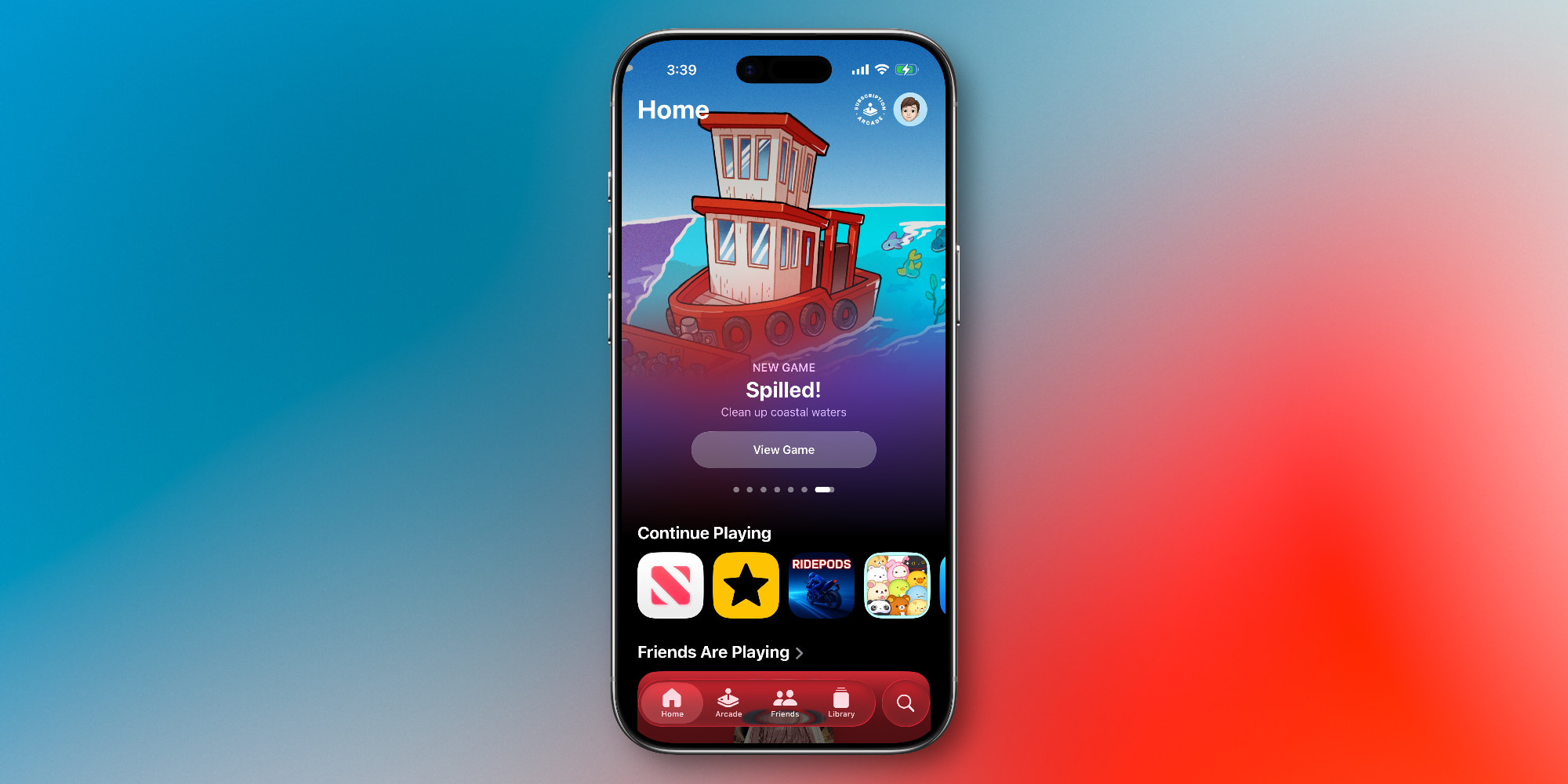
To appreciate the utility of the Apple Games application, one must dissect its internal structure. Opening the app reveals a clean, tabbed layout that will instantly feel intuitive to anyone familiar with Apple’s other media hubs, such as Apple TV, Apple Music, or Apple Podcasts.
The application is structured around five core pillars:
1. The Home Tab
Acting as the central command center, the Home tab utilizes algorithmic recommendations and user telemetry to offer a personalized entryway back into interactive media. It dynamically surfaces:
- Quick-launch shortcuts to titles the user has been playing most recently.
- Tailored recommendations for new App Store releases based on historical gameplay patterns.
- A real-time snapshot of what friends within your Game Center network are currently playing.
2. The Arcade Tab
Dedicated entirely to Apple Arcade, this section serves as a direct portal to Apple’s premium subscription gaming service. For a flat monthly fee (or included via the comprehensive Apple One bundle), subscribers gain unlimited access to a curated catalog of over 200 games entirely free of advertisements, disruptive microtransactions, or pay-to-win mechanics. The tab highlights new title drops, editor’s choices, and offline-ready adventures.
3. The Friends Tab
Social gaming has historically been an area where Apple lagged behind dedicated consoles like Xbox, PlayStation, and Nintendo Switch. The Friends tab modernizes Game Center by centralizing social activity. Users can view their friends’ recent achievements, track ongoing score battles, and instantly issue direct gaming challenges to prompt friendly competition.
4. The Library Tab
For power users with sprawling digital collections, the Library tab is arguably the most valuable asset. Enhanced heavily in the iOS 26.2 update, this section catalogs every game tied to the user’s Apple Account, whether currently installed on the local device or residing in cloud storage.
- Advanced Filtering: Users can sort titles by genre, controller support, offline availability, and completion status.
- Achievements & Events: Dedicated sub-sections track global leaderboards, earned trophies, and timed in-game events without requiring the user to boot up individual software titles to check progress.
5. The Search Tab
Beyond a traditional search bar for finding specific software titles, the Search tab functions as a discovery engine. It organizes the vast expanse of the App Store into easily digestible lifestyle and mechanical categories, including Multiplayer, Action, Family, Puzzle, Role-Playing, and Music games.
Official Statements and Industry Perspective
When introducing the concept, Apple’s executive team emphasized a philosophy of curation and unification. In the original June 2025 press release, Apple framed the application as an acknowledgment of the maturation of mobile gaming hardware:
"The introduction of the Apple Games app represents a fundamental evolution in how our users discover, play, and share interactive entertainment. By building a personalized home for games and social play across iPhone, iPad, and Mac, we are honoring the incredible depth and diversity of the developers who push the boundaries of what is possible on our silicon."
Industry analysts have largely echoed these sentiments, noting that as iPhones and iPads adopt hardware-accelerated ray tracing, console-to-mobile ports of massive AAA titles (such as Resident Evil, Death Stranding, and Assassin’s Creed), and advanced thermal management architectures, the operating system desperately required a dedicated launcher. The App Store remains an unmatched digital commerce engine, but commerce and community require different spatial environments to thrive.

Future Outlook: What Apple Games Means for the Industry
As we look past the rollout of iOS 26.2 and toward future software generations, the Apple Games app is uniquely positioned to reshape the mobile gaming landscape.
Bridging Mobile and Desktop Ecosystems
Because the app spans iPhone, iPad, and Mac under a unified iCloud and Game Center framework, it lays the groundwork for seamless cross-platform continuity. A player could theoretically pick up a puzzle progress save on an iPhone during a morning train commute, switch to an iPad during lunch, and finish a session on a Mac desktop paired with a mechanical controller, all orchestrated smoothly by the underlying Games infrastructure.
The Rise of Social and Competitive Mobile Play
By pulling Game Center out of the settings shadows and embedding it into a vibrant, activity-driven Friends tab, Apple is making a calculated play for the multiplayer and streaming demographic. Features like instant challenges and social feeds encourage higher retention rates, turning isolated single-player experiences into communal events.
Limitations and the Road Ahead
Despite its polish, the Apple Games app faces certain perceptual hurdles. Critics and power users note that while the library management and social tools are genuinely useful, much of the app’s discovery content mirrors what is already accessible via the traditional App Store. Its long-term success will hinge entirely on Apple’s willingness to introduce exclusive software features, deeper developer integrations (such as instant-play cloud demos), and richer telemetry dashboards.
Conclusion
The Apple Games app in iOS 26 is much more than a cosmetic re-skinning of existing utilities; it is a structural declaration that gaming is a core pillar of the Apple software ecosystem. By consolidating discovery, social competition, controller navigation, and library management into a single, cohesive hub across iPhone, iPad, and Mac, Apple has provided mobile gaming with the professional infrastructure it has needed for years. As developers continue to squeeze console-grade performance out of Apple Silicon, the Games app stands ready to serve as the front door to the next era of interactive entertainment.






Belum ada komentar. Jadilah yang pertama berkomentar!