

Executive Overview
The mobile gaming landscape has shifted dramatically over the past decade and a half. What began as a casual pastime populated by simple, physics-based puzzle games and match-three titles has rapidly evolved into a powerhouse ecosystem hosting massive, high-fidelity AAA console ports, sprawling multiplayer arenas, and an ever-expanding subscription service in Apple Arcade. Despite this exponential growth, the management of these games on Apple devices historically remained fragmented. Users would download titles from the App Store, track achievements through the deeply buried Game Center interfaces in system settings, and rely on folders or third-party launchers to organize their growing digital libraries.
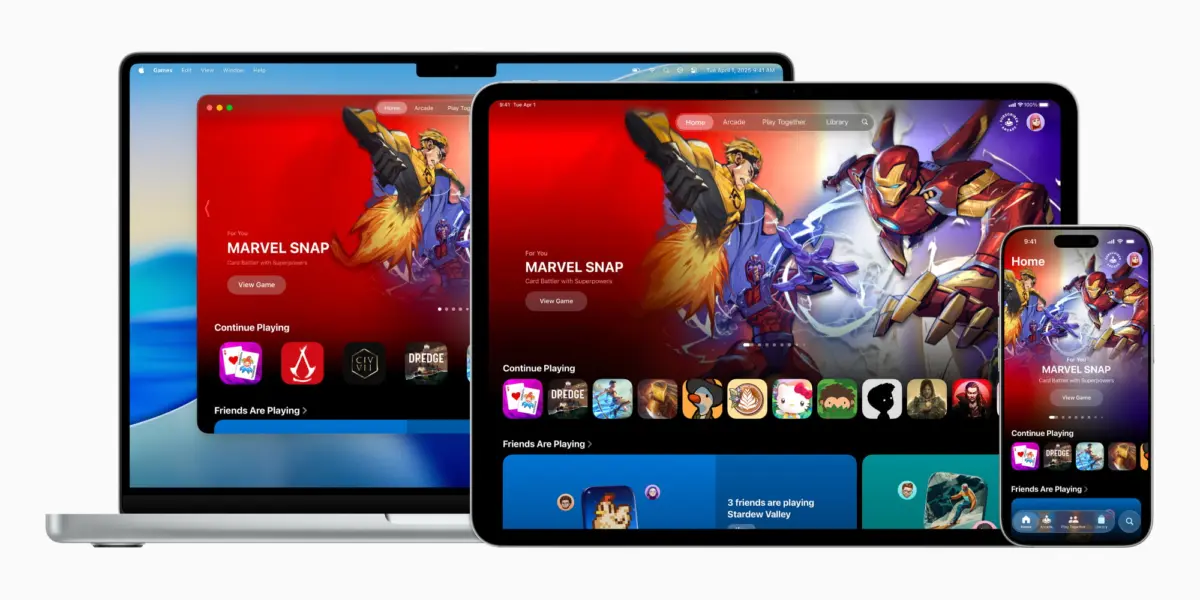
With the rollout of iOS 26, Apple has systematically addressed this fragmentation by introducing two brand-new, native applications to the iPhone home screen. Chief among them is Apple Games, a dedicated, centralized ecosystem built specifically to unify every facet of the gaming experience across iPhone, iPad, and Mac. Apple describes the application as "a personalized home for games and playing with friends."
This authoritative report explores the genesis, architecture, and core features of the Apple Games app, including recent iterative enhancements introduced in iOS 26.2. We will analyze how this ecosystem hub integrates casual and hardcore gaming, evaluates its social and organizational utility, and examines what this strategic pivot means for developers, competitors, and the future of Apple’s hardware-software synergy.
Detailed Chronology: From Rumor to Reality
The journey toward a dedicated gaming hub within Apple’s operating systems was not born overnight. For years, industry analysts and developers alike pointed out a glaring dichotomy in Apple’s software strategy: while the company poured massive technological investments into silicon—rolling out hardware-accelerated ray tracing, MetalFX upscaling, and powerful graphics processing units in both mobile chips and desktop M-series processors—the software experience for finding, launching, and managing those games remained remarkably disconnected.
Phase 1: The Incubation and Announcement (June 2025)
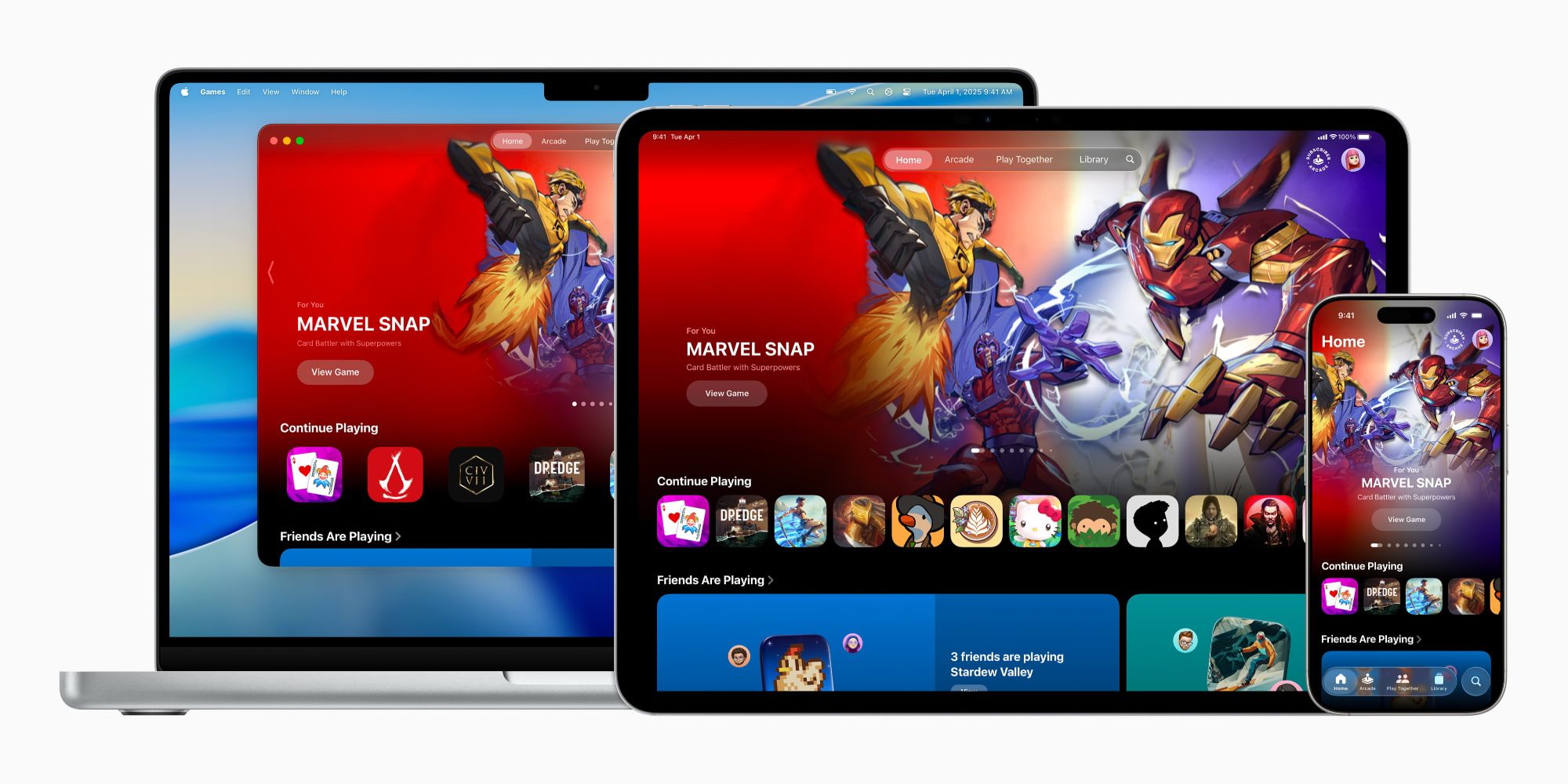
At Apple’s Worldwide Developers Conference (WWDC) in June 2025, the company officially pulled back the curtain on iOS 26. Alongside significant architectural updates and artificial intelligence refinements, the tech giant shocked and delighted the gaming community by announcing the Apple Games app. The preview showcased a clean, tabbed interface designed from the ground up to consolidate the disparate threads of mobile, tablet, and desktop gaming into a single pane of glass.
Phase 2: Public Beta and Ecosystem Integration (Summer to Fall 2025)
Throughout the summer developer and public beta cycles, the Games app evolved rapidly. Early builds laid the foundation for cross-device syncing, allowing users to seamlessly track titles across their ecosystems. When iOS 26 officially rolled out to the public in September 2025, the application was embedded directly onto millions of iPhone home screens, immediately altering how users interacted with their digital libraries.
Phase 3: The iOS 26.2 Refinements (Late 2025 – January 2026)
Apple did not rest on its laurels following the initial launch. In subsequent iterative updates—culminating in the rollout of iOS 26.2 in late 2025 and early 2026—the company introduced critical quality-of-life upgrades. Most notably, iOS 26.2 expanded library filtering tools and introduced comprehensive, native game controller navigation. This crucial addition meant that users utilizing external gamepads on their iPhones, iPads, or Macs could navigate the entire Games app interface without ever needing to touch their device screens, bridging a vital gap for console-style setups.
Anatomy of the Hub: Inside the Five Core Sections
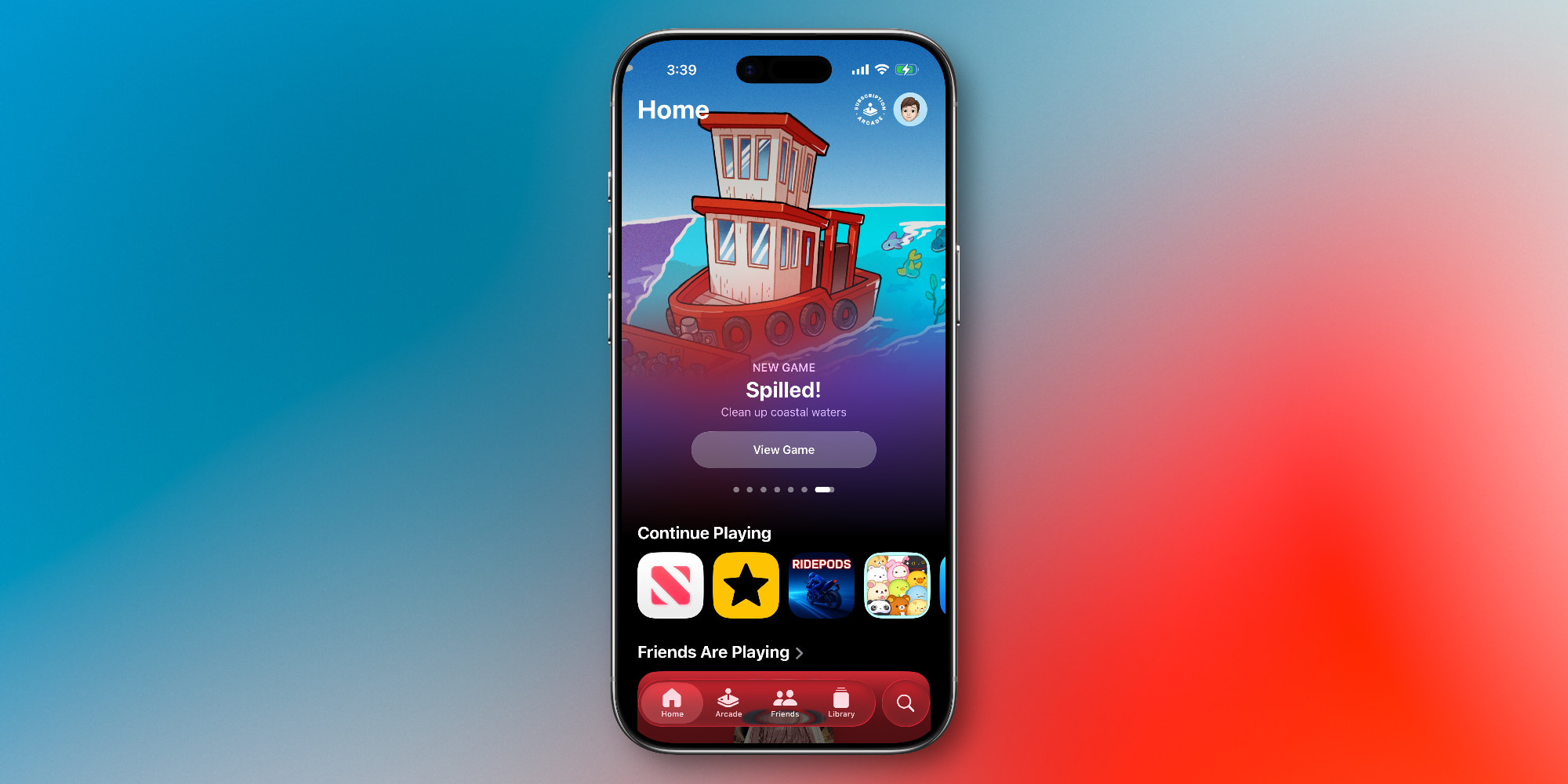
Navigating the Apple Games app immediately invokes a sense of familiarity for anyone accustomed to Apple’s broader media ecosystem. Borrowing design cues and architectural philosophies from Apple TV, Apple Music, Apple Books, and Apple Podcasts, the Games app organizes its interface into five distinct, easily accessible tabs along the bottom navigation bar.
+-----------------------------------------------------------------+
|                       APPLE GAMES APP                           |
+-------------+-------------+-------------+-------------+---------+
|    HOME     |   ARCADE    |   FRIENDS   |   LIBRARY   | SEARCH  |
| (Dashboard) | (Subscription)| (Social)  | (Management)| (Discovery)|
+-------------+-------------+-------------+-------------+---------+
1. The Home Tab: Your Personalized Dashboard
Serving as the primary landing page, the Home tab functions as a dynamic dashboard tailored to each individual user. If you have been deep into a sprawling open-world RPG or a quick puzzle fix on your commute, the Home tab places those recently played titles front and center for instant resumption.
Beyond quick-launch shortcuts, the Home tab leverages algorithmic curation to serve up personalized recommendations for new titles based on historical play data. It also provides a snapshot of what your friends are currently playing, creating a social runway that encourages users to jump into shared digital experiences.
2. The Arcade Tab: Premium Gaming Without Friction
Dedicated entirely to Apple Arcade, this tab serves as the portal to Apple’s premium subscription gaming service. For $6.99 per month—or as part of the comprehensive Apple One bundle—subscribers gain unlimited access to a catalog of over 200 games entirely free of advertisements, data-tracking markers, and in-app purchases.
The Arcade tab highlights new releases, curated collections, and timeless classics, ensuring that users can easily discover family-friendly titles, indie masterpieces, and exclusive experiences without digging through the transactional clutter of the traditional App Store.
3. The Friends Tab: Cultivating the Social Loop
Historically, Game Center operated as a background utility or a somewhat sterile settings menu. The Friends tab in the Apple Games app brings social gaming out of the shadows.
This section offers a centralized overview of your Game Center network, displaying friend activity feeds, unlocked achievements, and high scores. More importantly, it features direct action pathways that allow users to initiate gaming challenges, invite friends to multiplayer lobbies, and track competitive milestones effortlessly.
4. The Library Tab: Granular Organization for Power Users
As mobile titles grow in complexity, file sizes, and graphical fidelity, individual device storage quickly becomes crowded with dozens of games. The Library tab aggregates every game installed across your device ecosystem.
Enhanced significantly in the iOS 26.2 update, the Library tab provides robust filtering tools. Users can sort their collections by genre, frequency of play, local storage size, or controller compatibility. Furthermore, this tab houses localized tracking for in-game achievements, upcoming seasonal events, and milestone rewards, transforming a simple list of app icons into a comprehensive gaming dossier.
5. The Search Tab: Beyond Basic Queries
The Search tab goes far beyond a standard text input box. While it allows users to hunt for specific titles instantly, it also serves as an expansive discovery engine. Users can browse games broken down by granular categories—such as Multiplayer, Action, Family, Puzzle, Music, Strategy, and Role-Playing. This categorization bridges the gap between casual players looking for a quick time-waster and hardcore enthusiasts searching for deep, immersive experiences.
Supporting Context & Metrics: The State of Mobile Gaming
To understand why Apple invested engineering resources into building a native application for games, one must look closely at the quantitative data driving the modern gaming industry.
| Metric / Indicator | Industry Context (iOS Ecosystem) |
|---|---|
| User Penetration | Over 85% of active iPhone users engage with mobile games, ranging from hyper-casual titles to AAA blockbusters. |
| Monetization Shift | Driven by Apple Arcade and high-end console ports, subscription and premium upfront purchases are growing faster than ad-supported microtransactions. |
| Cross-Device Play | A staggering 40% of tablet and desktop gamers utilize controllers, making controller-first navigation paramount. |
| Fragmentation Challenge | Prior to iOS 26, the average user juggled games across the App Store, separate folders, and external launchers, leading to lower engagement with social and multiplayer features. |
The mobile gaming market no longer caters exclusively to the stereotypical "casual gamer." With mobile chips boasting architectural capabilities that rival traditional game consoles, developers are porting massive, hundred-hour experiences directly to the iPhone and iPad. Consequently, a centralized launcher like Apple Games was not merely an aesthetic luxury—it was an operational necessity to keep the platform cohesive.
Official Statements and Industry Perspective
Apple’s official rollout messaging emphasized the philosophy of connection and personalization. In the launch press release accompanying iOS 26, Apple highlighted the core ethos of the platform:

"The Apple Games app is designed to be a personalized home for games and playing with friends. Whether our users are jumping into a quick puzzle during their morning commute or settling in for an immersive multiplayer session with friends across the globe, Games brings everything together in one fluid, beautiful interface."
Industry analysts have largely praised the move, viewing it as a long-overdue maturation of Apple’s software ecosystem. By pulling Game Center out of the system settings and wrapping it in a consumer-friendly, media-app wrapper, Apple has effectively legitimized the iPhone and iPad as serious gaming platforms.
However, developer reception has been nuanced. While independent studios welcome the enhanced discoverability in the Search and Arcade tabs, some major publishers note that the app primarily serves as a launcher rather than an alternative storefront, meaning that traditional App Store optimization and marketing strategies remain paramount.
Future Outlook: Where Goes Apple Games From Here?
As iOS 26 continues to mature and developers build deeper integrations for the Games app APIs, the horizon looks exceptionally promising for Apple’s gaming vertical.
Several key trajectories are expected to shape the future of the platform:

- Deeper Cloud Integration: As cloud streaming and hardware-accelerated local rendering continue to advance, expect the Games app to serve as the unified gateway for seamless save-state syncing across Apple TV, iPad, Mac, and iPhone.
- Expanded Social Features: Future software iterations will likely introduce native voice and video party chatting directly within the Friends tab, reducing reliance on third-party communication apps like Discord during cooperative play.
- Hardware Synergy: With rumors swirling around future iterations of Apple-branded controllers and enhanced spatial computing integration via visionOS crossovers, the Games app is positioned to act as the master control center for all interactive entertainment across Apple hardware.
Conclusion
The introduction of the Apple Games app in iOS 26 marks a watershed moment for gaming on Apple devices. By transforming a historically fragmented experience into a cohesive, beautifully designed ecosystem hub, Apple has acknowledged the immense cultural and economic weight of the mobile gaming community.
While casual players may find themselves using the app primarily for quick launches, power users and social gamers will reap massive benefits from the robust library filtering tools, controller navigation support, and centralized Game Center challenges. As the boundaries between mobile, desktop, and console gaming continue to blur, Apple Games stands ready to anchor the future of interactive entertainment in the Apple ecosystem.









Belum ada komentar. Jadilah yang pertama berkomentar!