

Executive Overview
For years, the battle lines between Epic Games and Apple have left Mac users caught in the crossfire. Ever since Epic’s high-profile legal battle with Apple culminated in the removal of Fortnite from the iOS and macOS App Stores in 2020, the official stance from Epic Games has remained consistent: if you want to play Fortnite on a Mac, you must rely on cloud-streaming services like Xbox Cloud Gaming, Nvidia GeForce NOW, or Amazon Luna.
While these cloud options provide a viable avenue for casual players with robust internet connections, they come with inherent drawbacks, including input latency, compression artifacts, and subscription requirements. For dedicated gamers equipped with Apple Silicon hardware (M1, M2, M3, and M4 series chips), the inability to run the game natively has long been a source of frustration.
However, a clever community-driven workaround has recently emerged, allowing users to bypass cloud limitations entirely. By utilizing open-source developer tools hosted on GitHub—specifically a utility known as FnMacAssistant—users can download the native mobile (iOS/iPadOS) version of Fortnite, apply specialized patches, and run it locally on Apple Silicon Macs.
This in-depth report examines the technical mechanics behind this workaround, explores the ongoing legal and structural divide between Epic Games and macOS gaming, details the steps and security considerations involved, and analyzes what this means for the future of desktop gaming on Apple hardware.
Detailed Chronology: The Epic-Apple Feud and the Mac Gaming Drought
To understand why players are jumping through hoops to run Fortnite on a Mac today, it is essential to trace the history of the platform’s fragmentation.
August 2020: The Removal
In August 2020, Epic Games implemented a server-side hotfix in Fortnite that allowed players to purchase V-Bucks directly from Epic at a discounted rate, bypassing Apple’s mandatory 30% in-app purchase commission. In response, Apple removed Fortnite from the App Store and terminated Epic’s developer accounts. Because macOS development and distribution are heavily tied to Apple’s proprietary ecosystem and signing infrastructure, the native Mac version of Fortnite—which had previously shared cross-play parity with other platforms—was left frozen on an outdated patch (v13.40), completely severed from future updates, seasons, and the community.
2021–2023: The Cloud Era
As the legal battles dragged through federal courts, Epic Games officially redirected Mac users toward cloud gaming. While Nvidia GeForce NOW and Xbox Cloud Gaming offered functional paths to the battle royale island, the experience was fundamentally different from running code natively on a high-performance M-series processor. Apple Silicon chips, renowned for their unified memory architecture and impressive graphics processing capabilities, sat largely underutilized for high-end competitive shooters.
Late 2023–2025: The Rise of Apple Silicon Sideloading
As Apple’s transition away from Intel became total, the hardware capability of Macs skyrocketed. At the same time, the developer community refined tools for sideloading and patching iOS applications to run on macOS architectures (which share a common lineage with iOS under Apple Silicon). Projects aimed at adjusting entitlements, modifying plist files, and resigning mobile binaries matured. This paved the way for dedicated community tools like FnMacAssistant, which automates the retrieval and patching of the official mobile Fortnite IPA for execution on macOS.
Technical Deep-Dive: How FnMacAssistant Works
Apple Silicon Macs possess the underlying CPU and GPU architecture capable of running iOS apps natively. Because iPadOS and iOS applications can execute on macOS, developers realized that mobile versions of games could theoretically run on desktop hardware if the proper installation packages (IPAs) could be acquired, modified, and signed.
The Role of FnMacAssistant
Hosted publicly on GitHub, FnMacAssistant functions as an automated script and assistant designed to streamline a traditionally complex process.
- IPA Acquisition: The tool assists users in downloading the latest official mobile IPA package for Fortnite.
- Automated Patching: Because mobile apps lack the specific entitlements, window management parameters, or input mappings required for a smooth desktop experience, the assistant applies necessary patches to bridge the gap between touch-based mobile code and keyboard/mouse or controller inputs on macOS.
- App Signing: To run any custom or modified IPA on a Mac without a paid Apple Developer Program membership, the application must be "signed" using a standard Apple ID. Tools like Sideloadly or integrated functions within the assistant allow users to sign the application locally, tricking macOS into executing the code.
The User Experience and Hardware Performance
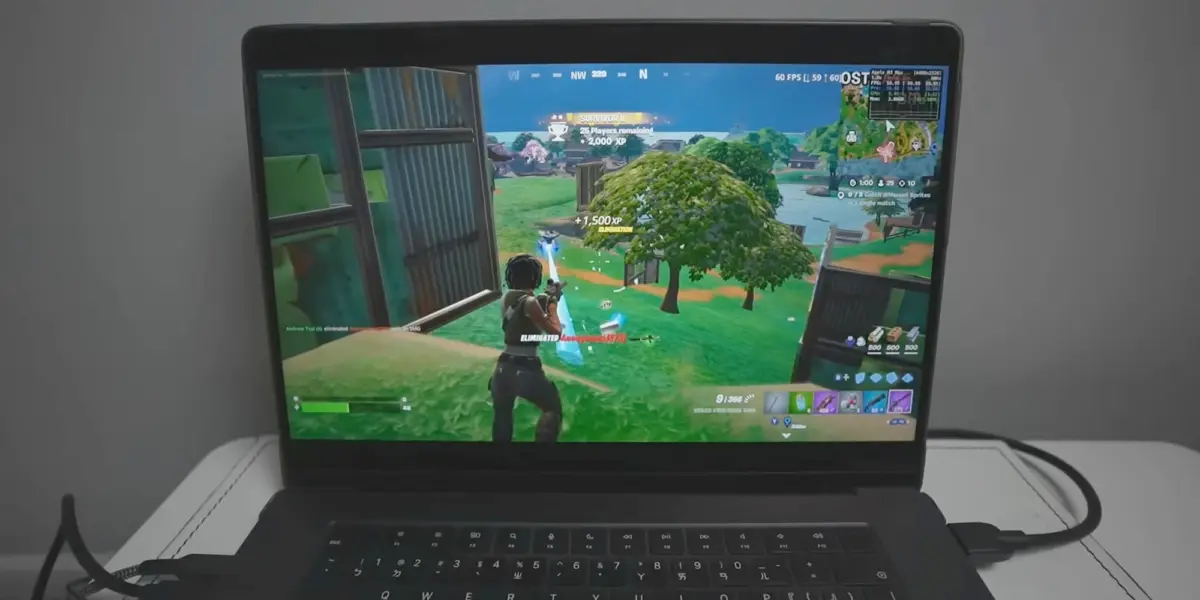
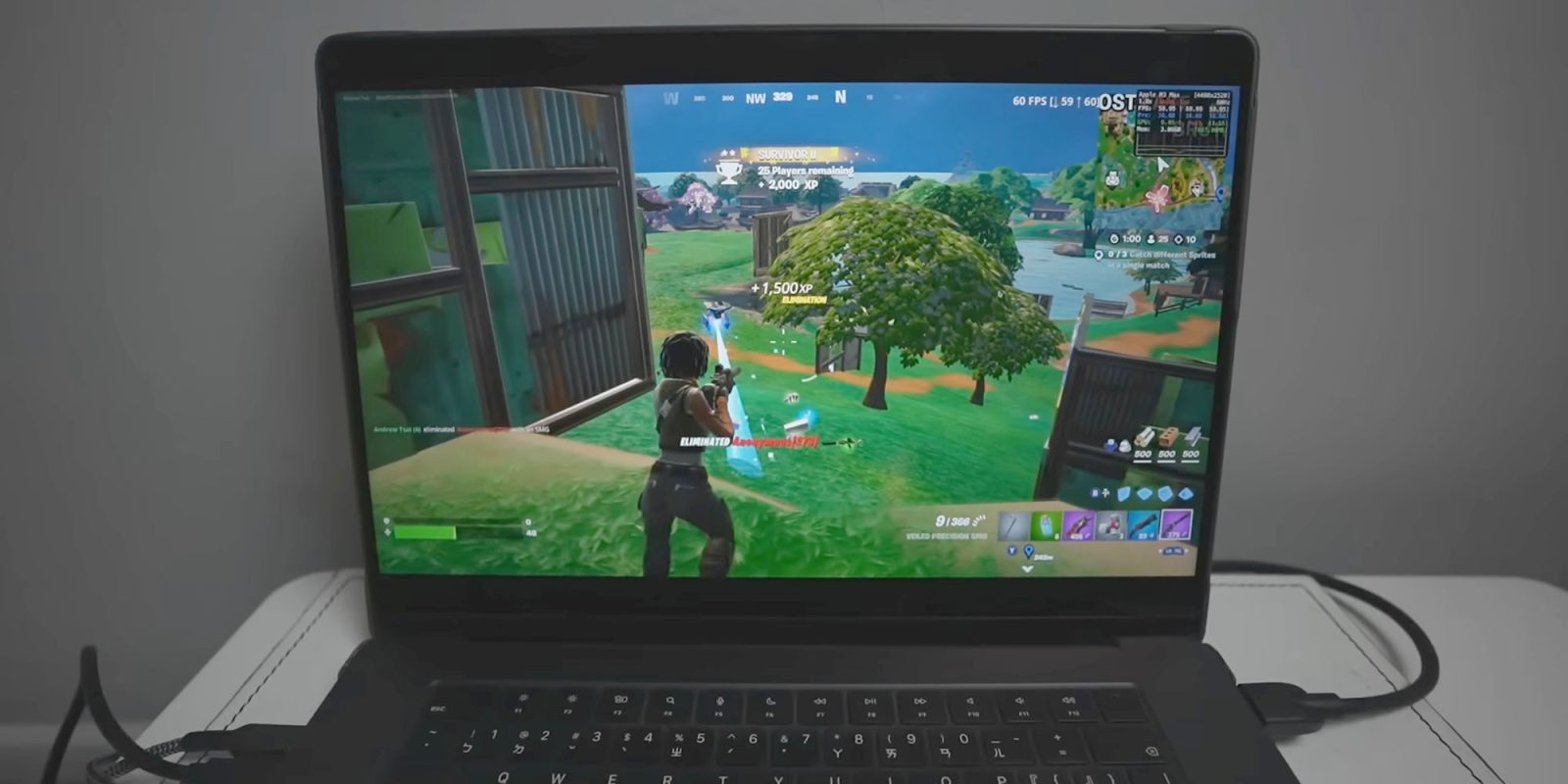
According to demonstrations by prominent tech creators and community figures—such as Andrew Tsai, founder of AppleGamingWiki—running native mobile Fortnite via this method yields surprising performance metrics. On modern Apple Silicon hardware, such as M3 and M4 MacBook Pros, the game bypasses the bitrate compression and lag associated with cloud streaming.
However, users must accept certain compromises. Because the game being executed is fundamentally the mobile/tablet port scaled to desktop environments, user interface elements, graphical settings ceilings, and control optimizations reflect mobile architecture rather than a traditional PC build. Furthermore, meticulous attention to detail is required during installation; skipping even a single configuration step in the setup guide frequently results in launch failures or crashes.

Supporting Context, Metrics, and Security Considerations
While the prospect of native Fortnite on a Mac is enticing, prospective users must weigh the technical hurdles and security implications.
The Precision Required in Execution
Community forums and Reddit troubleshooting threads reveal a high volume of user error during the installation process. Common pitfalls include:
- Misconfigured provisioning profiles.
- Failing to grant necessary system permissions in macOS Security & Privacy settings.
- Using outdated versions of signing certificates.
The GitHub repository for FnMacAssistant includes detailed troubleshooting logs for these common errors, and community support channels—such as the dedicated Fortnite Mac Discord—have become bustling hubs for peer-to-peer technical assistance.
Security and Apple ID Credentials
A critical security consideration involves the app-signing process. To sideload and sign the patched IPA without a developer license, users must input their personal Apple ID credentials into the signing utility.
- The Risk: Entering personal Apple credentials into third-party open-source tools always carries an inherent risk, regardless of how thoroughly the community audits the code.
- The Best Practice: Cybersecurity experts consistently recommend using a secondary or burner Apple ID specifically for sideloading tasks to isolate primary personal accounts, iCloud data, and financial information from potential exposure.
Official Statements and Industry Perspective
The standoff between major software publishers and hardware gatekeepers continues to shape the desktop gaming landscape.
Epic Games’ Official Position
Epic Games maintains its stance that direct support for macOS remains sidelined due to ongoing policy disagreements with Apple. In its official documentation, the company states:

"Is Fortnite available on Mac? No, but you can play Fortnite on Mac via cloud gaming with Xbox Cloud Gaming, Nvidia GeForce NOW, or Amazon Luna."
Epic has historically argued that Apple’s walled-garden approach to app distribution and payment processing stifles fair competition, preventing them from launching their own storefront and ecosystem natively on macOS under economically viable terms.
Apple’s Gaming Push vs. Reality
Apple, meanwhile, has invested heavily in promoting AAA gaming on Mac. Through initiatives like the Game Porting Toolkit, dedicated Metal 3 APIs, and high-profile titles ported by developers (such as Resident Evil, Death Stranding, and Cyberpunk 2077), Apple aims to shed its long-standing reputation as a hostile environment for hardcore gamers.
Yet, the glaring omission of mainstream juggernauts like Fortnite via official native channels highlights the limits of hardware capability when corporate policy and legal disputes stand in the way. Workarounds like FnMacAssistant demonstrate that while Apple provides the silicon muscle, community ingenuity is often required to bridge the gap left by corporate stalemates.
Future Outlook: What Lies Ahead for Mac Gamers?
As the legal landscape surrounding app stores shifts globally—spurred by regulatory pressures such as the European Union’s Digital Markets Act (DMA)—the mechanisms governing software distribution on mobile and desktop operating systems are evolving.
- Alternative App Stores: As alternative marketplaces gain traction, the potential for Epic Games Store infrastructure to officially reach macOS and iOS outside of traditional gatekeeper channels becomes more plausible over the long term.
- Apple Silicon Evolution: With Apple continuing to push the envelope in GPU ray tracing, unified memory bandwidth, and thermal efficiency, the hardware argument against complex native gaming on Macs is entirely dead. The bottleneck is now exclusively legal and logistical.
- The Lifespan of Sideloading Workarounds: Until an official native client returns to macOS through sanctioned channels, community-driven projects like FnMacAssistant will likely remain the gold standard for enthusiasts determined to extract maximum performance out of their machines. However, these methods will continually face the cat-and-mouse game of anti-cheat updates, game patches, and Apple certificate revocations.
For now, Mac gamers willing to navigate GitHub repositories, master terminal commands, and follow meticulous step-by-step guides finally have a tangible way to experience Fortnite as it was meant to be played: locally, natively, and without the jitter of a cloud server.






Belum ada komentar. Jadilah yang pertama berkomentar!