

Executive Overview
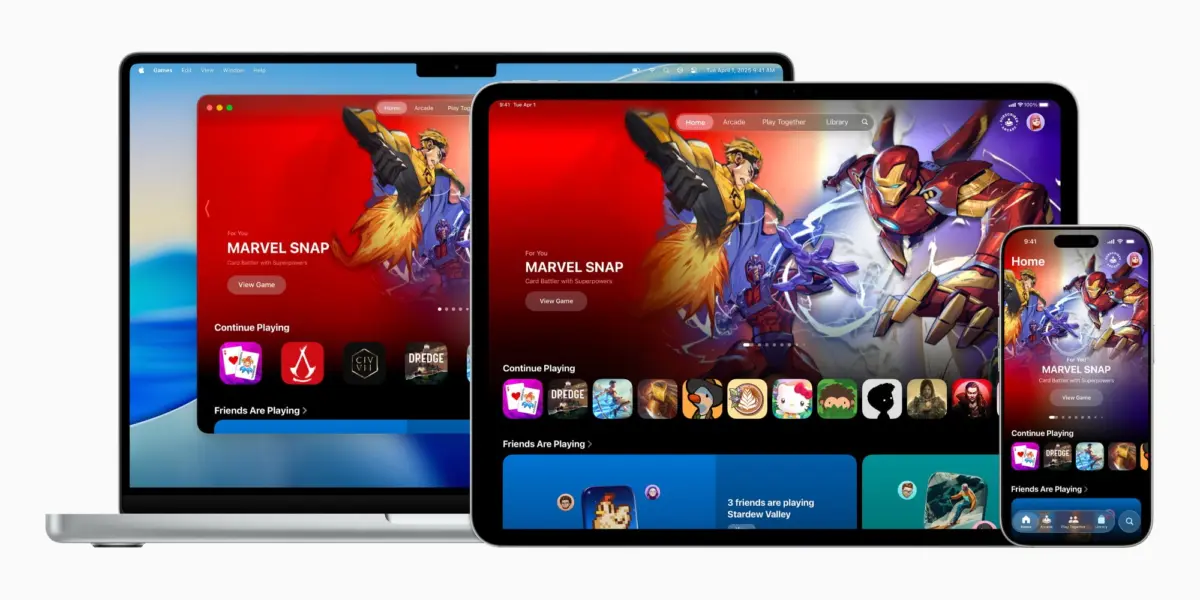
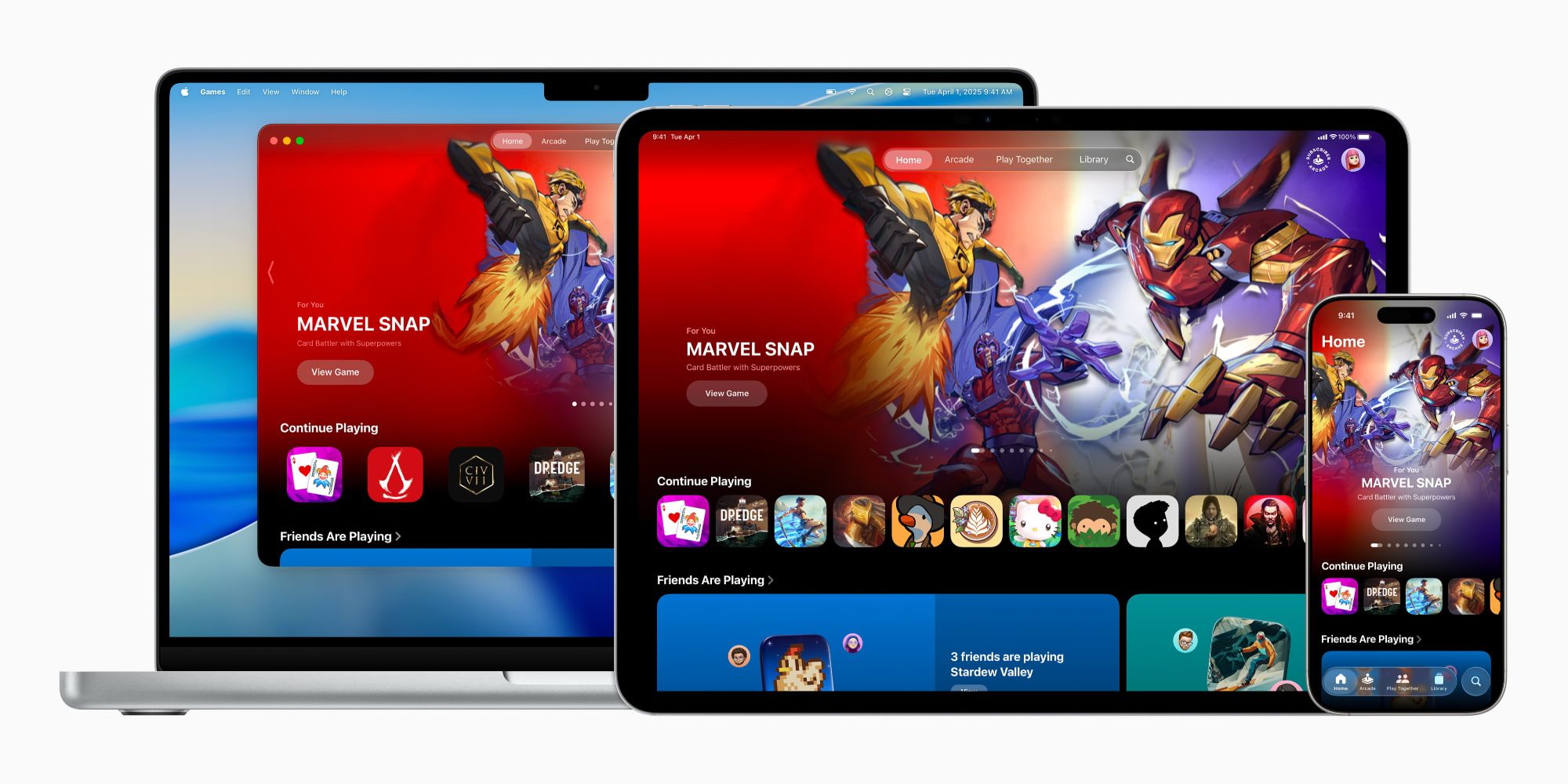
The landscape of mobile and portable gaming has fundamentally shifted with the rollout of iOS 26. Among the software update’s most significant headliners is the introduction of two brand-new, native applications designed to streamline the user experience. Chief among these is Apple Games, a dedicated, centralized hub built specifically to organize, enhance, and socialize the entire gaming footprint across Apple’s ecosystem—spanning iPhone, iPad, and Mac.
For years, the App Store has acted as both the storefront and the de facto library for iOS titles, ranging from casual, quick-hit match-three puzzle games to sprawling, console-quality AAA blockbusters. However, as mobile hardware has advanced to rival dedicated gaming consoles, the fragmented nature of managing local installs, tracking social achievements, and discovering new titles became an increasing friction point for users.
Apple Games addresses this directly. Billed by Apple as "a personalized home for games and playing with friends," the app unifies local titles, social Game Center mechanics, and the expansive catalog of Apple Arcade into a single, cohesive dashboard. With subsequent updates—most notably iOS 26.2—the application has matured rapidly, introducing robust library-filtering tools, enhanced controller navigation, and streamlined matchmaking. This report provides a comprehensive examination of the Apple Games ecosystem, its core structural features, the motivations behind its release, and what this strategic pivot means for the future of gaming on Apple devices.
Detailed Chronology: From Concept to the iOS 26.2 Evolution
The journey toward a dedicated gaming application within the Apple ecosystem has been a gradual, deliberate process rather than a sudden pivot. Understanding how Apple Games materialized requires examining the timeline of its development, announcement, and subsequent refinements.
The Buildup and WWDC Announcement
Long before the official release of iOS 26, developers and industry analysts had noted a distinct segmentation in how Apple handled its media. While music, podcasts, books, and television each enjoyed dedicated native software hubs that separated them from raw transactional commerce, gaming remained tethered entirely to the App Store. Users had to rely on a mix of App Store update queues, the Game Center settings panel, and third-party organization tools to manage their libraries.
The paradigm shifted during Apple’s major software showcase, where the company officially announced the Apple Games app as part of the iOS 26 feature suite. Positioned as a core pillar of the new operating system, the announcement press release framed the app as an ecosystem-wide initiative. Apple confirmed that the software would not be restricted to the iPhone alone, but would launch simultaneously across iPadOS and macOS, ensuring a unified gaming profile regardless of the hardware platform in use.
The Summer Beta Cycle and User Feedback
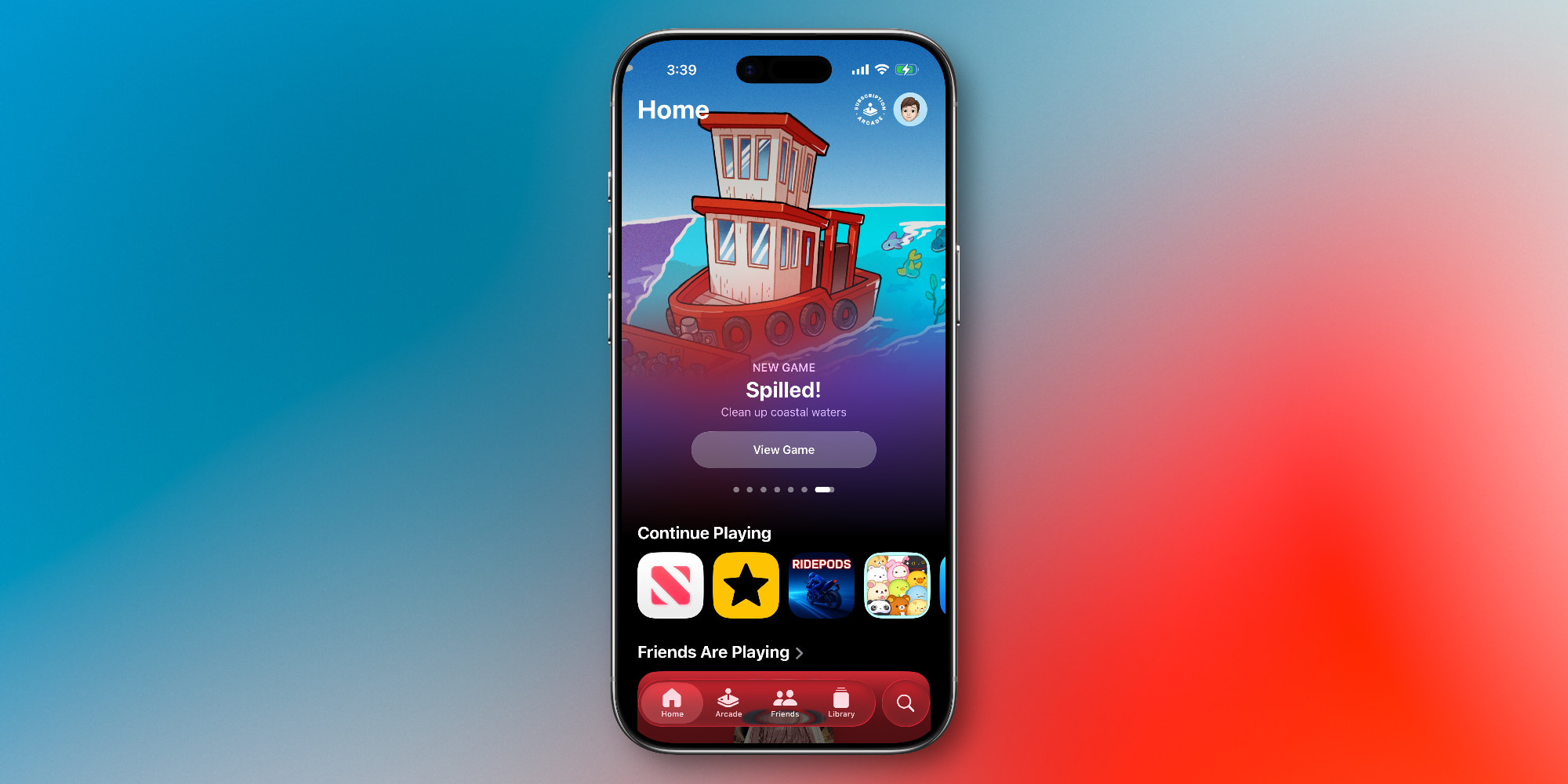
Throughout the beta testing phases following the initial announcement, early adopters and developers scrutinized the app’s interface. Initial builds focused primarily on establishing the foundational tabs: Home, Arcade, Friends, Library, and Search.
During this phase, user feedback heavily centered on library management. As users downloaded heavier, high-end titles alongside smaller casual games, the lack of sorting parameters became apparent. Testers pushed for better categorization, faster access to patch notes, and clearer visibility into friend achievements without needing to jump through the legacy Game Center interface.
The iOS 26.2 Refinements
Apple’s response to early user feedback culminated in the release of iOS 26.2, a mid-cycle update that substantially elevated the utility of the Apple Games application.
- Expanded Library Filtering: iOS 26.2 introduced three major improvements to the Library tab, allowing users to sort installed games by genre, playtime frequency, controller compatibility, and storage footprint. This transformation turned a rudimentary list into a powerful asset management tool.
- Seamless Controller Navigation: Recognizing that many users prefer physical gamepads—such as PlayStation, Xbox, or MFi-certified controllers—for titles on iPhone, iPad, and Mac, Apple engineered native controller support directly into the Games app UI. With iOS 26.2, players can navigate every tab, search catalog databases, and manage friend requests entirely through their controller, eliminating the awkward friction of alternating between physical buttons and touch input.
- Optimized Matchmaking and Challenges: The integration of the Friends tab was deepened, allowing for frictionless game-launching directly from social challenge notifications.
Supporting Context & Metrics: The State of iOS Gaming
To fully grasp why Apple has invested engineering bandwidth into a standalone gaming hub, one must analyze the current economic and cultural weight of gaming on iOS.
The Mobile Gaming Juggernaut
The iPhone is arguably the most ubiquitous gaming platform on the planet. According to industry data, mobile gaming commands the largest share of the global video game market revenue, easily outpacing traditional PC and console sectors combined. Apple’s hardware—bolstered by powerful A-series and M-series silicon equipped with hardware-accelerated ray tracing, MetalFX upscaling, and sustained thermal performance—has evolved into a legitimate high-end gaming platform.
The App Store hosts an immense spectrum of digital entertainment:
- Casual Players: Millions of users engage daily with hyper-casual, puzzle, and match-three titles.
- Core & Mid-Core Gamers: Titles spanning competitive multiplayer shooters, gacha RPGs, and strategy games maintain massive, highly active player bases.
- AAA Enthusiasts: High-end console ports (such as Resident Evil, Death Stranding, and Assassin’s Creed titles) demonstrate that Apple devices can handle desktop-grade assets.
Despite this diverse audience, discovering and organizing these disparate experiences historically required navigating a storefront optimized for all applications, not just games. Apple Games separates entertainment discovery from utility app downloads, giving games the dedicated digital real estate they require.
Breaking Down the Five Core Tabs
The interface of the Apple Games app is intentionally designed to feel familiar to anyone accustomed to Apple’s other media ecosystems (such as Apple TV or Apple Music). Upon launching the application, users are greeted by five distinct navigation sections:
- Home: Acting as the primary launchpad, the Home tab serves up a personalized digest. It surfaces recently played titles for instant resumption, curates tailored recommendations based on personal history, and highlights what friends within your Game Center network are currently playing.
- Arcade: This tab is dedicated exclusively to Apple Arcade, Apple’s subscription-based gaming service. For a flat monthly fee (or as part of the Apple One bundle), subscribers gain unlimited access to a curated catalog of over 200 games completely free of ads, microtransactions, and in-app purchases. The Arcade tab simplifies discovery within this walled garden, showcasing new releases, seasonal updates, and editorial collections.
- Friends: Designed to revitalize social gaming, this section aggregates Game Center activity. Users can view friend milestones, compare achievements, track multiplayer invites, and instantly initiate direct gaming challenges without needing to navigate away to secondary menus.
- Library: The repository for all games locally installed or previously purchased on the device. Following the iOS 26.2 updates, this tab features advanced filtering parameters, making it effortless to organize titles, track local storage usage, and review accumulated achievements or upcoming in-game events.
- Search: Beyond a standard text search bar for tracking down specific titles, this section acts as a categorized discovery portal. Users can browse games grouped by genre—such as Action, Multiplayer, Puzzle, Family, and Music—allowing for intuitive browsing when a player knows the type of experience they want, but not the specific title.
Official Statements and Industry Perspective
While Apple has historically kept its software development philosophies closely guarded, the launch statements surrounding the platform shed light on the company’s long-term vision for digital entertainment.
In the initial corporate rollout, Apple emphasized that the application was engineered to build a tighter social fabric around mobile play. "Apple Games is designed to be a personalized home for games and playing with friends," corporate announcements stated, highlighting the shift toward community-driven mechanics. By lowering the barrier to entry for multiplayer coordination and shared achievements, Apple aims to foster a more connected gaming ecosystem.

Third-party developers have largely welcomed the move. Game studios that previously struggled to stand out amidst the endless noise of the general App Store charts now have a dedicated platform where editorial features, curated recommendations, and genre-specific browsing naturally spotlight their products. Furthermore, the integration of controller support natively within the app underscores Apple’s commitment to courting traditional, hardcore gamers who demand a seamless, console-like hardware and software loop.
Future Outlook: What Lies Ahead for Apple Games
As iOS 26 continues its lifecycle and developers look toward future software iterations, the Apple Games app is uniquely positioned to evolve into the command center for all digital play across the Apple ecosystem.
Several potential trajectories stand out for the platform’s future:
- Deeper Cloud Integration: As cloud gaming and cross-device progression become increasingly standardized, the Games app could serve as the universal nexus that tracks save states seamlessly between an iPhone used on the commute, an iPad used on the couch, and a Mac driving a high-resolution display at a desk.
- Expanded Social Features: Future updates may introduce native voice chat integration, community streaming hooks, or expanded guild/clan management tools, bringing the iOS social experience closer to traditional PC and console ecosystems.
- Enhanced Hardware Synergies: With rumors of future Apple hardware iterations continuing to focus heavily on graphical computing power and controller ecosystems, Apple Games will likely act as the primary showcase for bleeding-edge technical demonstrations, such as advanced MetalFX rendering and spatial audio integration.
Ultimately, whether a user is an intermittent puzzle player or a dedicated enthusiast logging hours into graphically demanding titles, Apple Games provides a polished, unified framework. While casual users may still find themselves bouncing between the traditional App Store and the new hub, for dedicated mobile gamers and social players, the application transitions from a welcome organizational tool into an indispensable staple of the modern iOS experience.









Belum ada komentar. Jadilah yang pertama berkomentar!