

Executive Overview
For years, the battle lines between Epic Games and Apple have left Mac enthusiasts caught in the crossfire. Ever since Fortnite was unceremoniously yanked from the iOS App Store and macOS ecosystem in August 2020 amid an antitrust legal slugfest, playing the wildly popular battle royale title on a Mac has required compromise. Officially, Epic Games directs players toward cloud-streaming alternatives such as Xbox Cloud Gaming, Nvidia GeForce NOW, and Amazon Luna. While functional, these services introduce latency, demand robust internet connections, and lack the frictionless performance of a locally rendered application.
However, a clever workaround has emerged from the developer community that bypasses cloud dependencies entirely. Thanks to open-source tooling hosted on GitHub—specifically a utility known as FnMacAssistant—users with Apple Silicon Macs (M1, M2, M3, and M4 series chips) can now download, patch, and execute the native mobile version of Fortnite directly on their desktop and laptop hardware.
This development represents a fascinating convergence of Apple’s custom silicon architecture and grassroots software engineering. Because Apple Silicon shares an underlying instruction set architecture (ARM) with iOS devices, iPadOS and iOS applications can natively run on macOS. While Epic Games intentionally blocks its iOS app from running on Macs, community-driven patching tools have found a way to bridge the gap.
This article explores the technical reality of running native Fortnite on Apple Silicon, examines the installation process, reviews the necessary precautions regarding side-loading and Apple ID usage, and analyzes what this means for the broader landscape of Mac gaming.
Detailed Chronology: The Rift Between Epic Games and Apple
To understand why players must resort to community scripts to play Fortnite on a Mac, one must revisit the fractured timeline of Epic’s relationship with Apple—a corporate feud that fundamentally altered the mobile and desktop gaming landscapes.
August 2020: The Catalyst
The saga began when Epic Games implemented a hotfix into the mobile version of Fortnite, allowing players to purchase V-Bucks directly from Epic at a discount while bypassing Apple’s mandatory 30% in-app purchase fee. Swiftly and decisively, Apple removed Fortnite from the App Store. Epic responded immediately by filing a sweeping antitrust lawsuit against Apple, accusing the tech giant of anti-competitive monopolistic practices. In retaliation, Apple terminated Epic’s developer accounts, cutting off access to macOS and iOS software development kits (SDKs). Consequently, the Mac version of Fortnite, which relied on an outdated engine build, was frozen in time and eventually rendered entirely unplayable.
2021–2023: The Cloud Era
As the legal battles dragged on through federal courts, Epic Games sought alternative avenues to keep Mac and iOS users engaged. Because direct installation was blocked, Epic partnered with cloud providers. Through browser-based streaming platforms like Xbox Cloud Gaming (powered by Microsoft Azure) and Nvidia GeForce NOW, Mac users could once again drop onto the Island. Yet, cloud gaming is an imperfect substitute. Input lag, visual compression artifacts from video streams, and subscription or queue requirements meant that the definitive, responsive Fortnite experience remained out of reach for traditional computer gamers.
Late 2023–2025: The Rise of Apple Silicon and Sideloading
The release of Apple’s M-series chips dramatically shifted the technical paradigm. By unifying the architecture of iPhones, iPads, and Macs, Apple inadvertently created a backdoor for running mobile software on desktop hardware. While Apple attempted to let developers block their iOS apps from running on macOS, savvy software engineers quickly realized that application packages (IPAs) could be manually downloaded, decrypted, patched, and signed for local execution.
This laid the groundwork for developer-led tools. Projects like Sideloadly paved the way for general app side-loading, but it wasn’t until recently that dedicated workflows specifically tailored for Fortnite crystallized on platforms like GitHub and Discord, culminating in utilities such as FnMacAssistant.
Technical Mechanics: How FnMacAssistant Brings Mobile Code to Desktop Macs
Running a mobile game natively on a desktop operating system sounds paradoxical, but Apple Silicon’s hardware design makes it surprisingly feasible—with some technical intervention.
The ARM Architecture Synergy
Traditional Intel-based Macs required developers to compile separate x86_64 binaries for macOS games. Apple Silicon, however, is built on the ARM architecture—the exact same foundational architecture that powers modern iPhones and iPads. When Apple introduced M-series chips, macOS was engineered to natively run iOS and iPadOS applications out of the box, provided the developer permits it.
Epic Games, naturally, does not permit the Fortnite iOS app to run on macOS. When an unsupported iOS IPA is launched on a Mac, the operating system normally blocks execution. This is where FnMacAssistant enters the equation.
The Patching Process
The GitHub-hosted assistant automates a complex sequence of steps:
- IPA Acquisition: It assists users in downloading the latest legitimate, encrypted or decrypted mobile IPA file for Fortnite.
- Binary Modification: It applies specific binary patches designed to fool the application environment, bypassing checks that flag unsupported hardware or unauthorized operating system states.
- App Signing: Because the app is being side-loaded rather than downloaded from the official Mac App Store, it must be cryptographically signed. Users must input their Apple ID credentials to generate a local signing certificate, a process familiar to anyone who has used tools like Sideloadly or AltStore.
[User Action: Run FnMacAssistant]
       │
       ▼
[Download Latest Fortnite iOS/iPadOS IPA]
       │
       ▼
[Apply Binary Patches (Bypass Hardware/OS Restrictions)]
       │
       ▼
[Sign Application Locally via Apple ID Credentials]
       │
       ▼
[Execute Native Mobile App on Apple Silicon macOS]
Performance and Visuals
Because the code executes natively on the CPU and GPU cores of the Apple Silicon chip rather than decoding a video stream from a remote cloud server, the performance characteristics are striking. Frame rates are often exceptionally high, particularly on M2, M3, and M4 Pro/Max variants. Input latency is virtually eliminated, offering a crisp, responsive mouse-and-keyboard or controller experience that rivals traditional PC gaming.
However, compromises remain. Because the game running is fundamentally the mobile version of Fortnite, the user interface, touch-control layout mappings (which must be remapped to desktop peripherals), and graphical preset configurations reflect mobile optimization standards rather than dedicated high-end PC DirectX 12 or Vulkan implementations.
Supporting Context & Metrics: The State of Mac Gaming
To fully grasp the significance of this community workaround, one must look at the broader context of gaming on macOS. Historically dismissed as a wasteland for AAA gaming due to low market share and proprietary graphics APIs (Metal versus DirectX), Apple has made aggressive pushes in recent years to court developers.

Apple’s Game Porting Toolkit
With the introduction of macOS Sonoma and the Game Porting Toolkit (GPTK), Apple provided developers with an emulation environment to quickly evaluate how Windows games would run on Apple Silicon. This initiative catalyzed a wave of high-profile native ports, including Resident Evil, Death Stranding, Cyberpunk 2077 (via upcoming updates), and Baldur’s Gate 3.
| Feature | Cloud Gaming (GeForce NOW / Xbox) | Native Mac App Store / PC | Side-loaded Mobile Native (FnMacAssistant) |
|---|---|---|---|
| Input Latency | Noticeable (Dependent on connection) | Negligible | Negligible |
| Visual Quality | Subject to compression/bitrate | Maximum PC/Console settings | Mobile/iPad graphical fidelity |
| Internet Requirement | High-speed broadband mandatory | Required for multiplayer only | Required for multiplayer only |
| Official Support | Fully endorsed by Epic Games | None (Blocked) | Unofficial / Community-driven |
| Setup Complexity | Low (Sign up and play) | Low | Moderate (Requires meticulous following of guides) |
Despite these advancements, competitive multiplayer giants have been slow to embrace macOS. Anti-cheat software kernels often tie deeply into Windows operating systems, making cross-platform ports technically difficult or commercially unviable in the eyes of major publishers like Epic Games. Consequently, single-player titles thrive on modern Macs, while competitive heavyweights like Fortnite remain walled off.
Official Statements and Community Caveats
As expected, neither Apple nor Epic Games provides official support for side-loaded mobile apps running on desktop hardware. Epic Games’ official support documentation maintains its stance regarding macOS availability:
"Is Fortnite available on Mac? No, but you can play Fortnite on Mac via cloud gaming with Xbox Cloud Gaming, Nvidia GeForce NOW, or Amazon Luna."
While Epic remains strictly focused on cloud delivery for Mac users, the open-source community operates independently. The GitHub repository for FnMacAssistant comes with extensive documentation, troubleshooting logs, and community support channels, notably an active Fortnite Mac Discord server where users swap configuration files, mapping profiles, and error fixes.
Risks and Caveats
Engaging in side-loading requires caution. Industry experts and experienced developers highlight several important caveats:
- Meticulous Execution: Reddit threads and GitHub issue logs reveal that the majority of installation failures stem from users skipping minor steps in the instruction manual.
- Apple ID Security: Sideloading via free developer certificates requires inputting personal Apple ID credentials. While tools like Sideloadly and
FnMacAssistantare widely trusted within the enthusiast community, users must weigh the privacy and security implications of providing credentials to third-party scripts. Furthermore, free developer certificates typically expire every 7 days, requiring periodic re-signing. - Account Safety: Epic Games enforces strict anti-cheat and security measures. While playing the mobile version via an ARM-native wrapper generally utilizes legitimate game files, there is always an inherent, non-zero risk that server-side detection mechanisms could flag modified client environments, leading to account penalties. Users proceed entirely at their own risk.
Expert Insights: Andrew Tsai’s Analysis
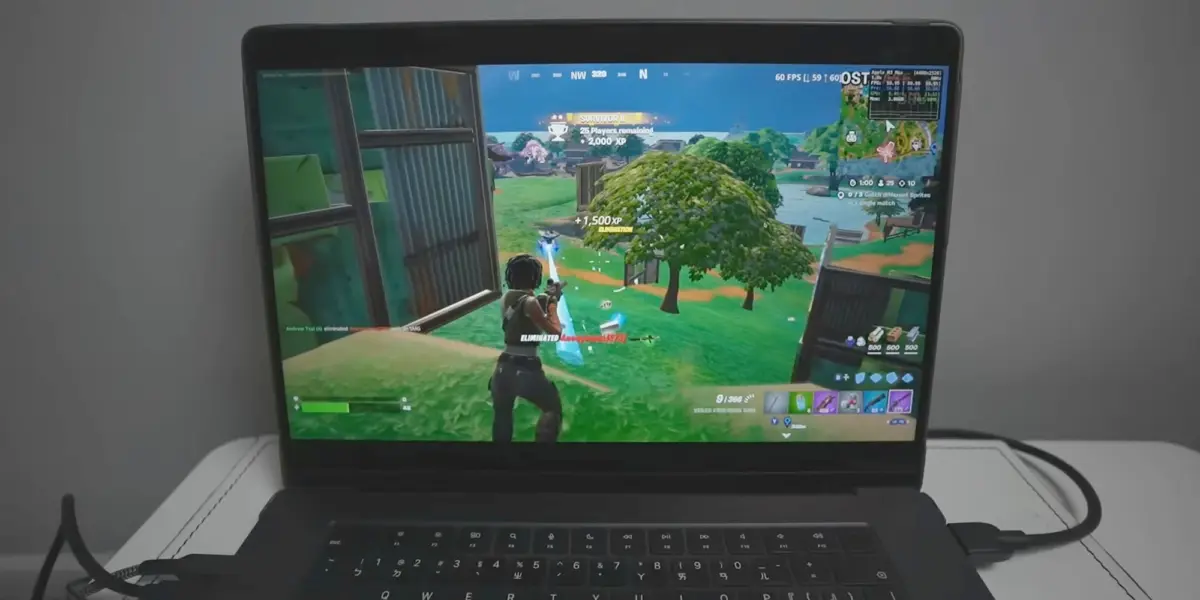
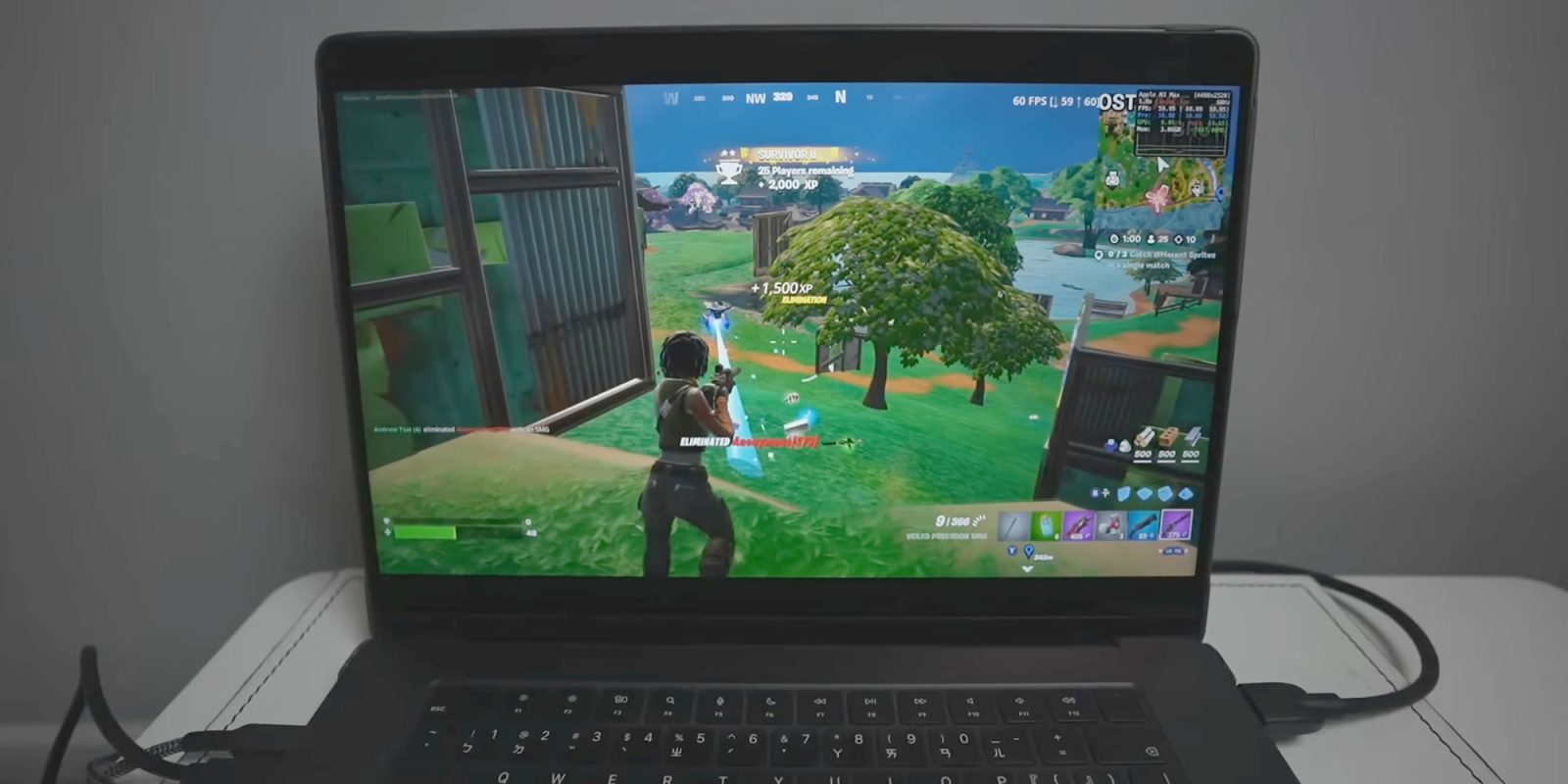
Prominent tech creator and founder of AppleGamingWiki, Andrew Tsai, released a comprehensive deep-dive video demonstrating the gameplay of native Fortnite running on an M3 MacBook Pro.
In his breakdown, Tsai walks viewers through the entire installation pipeline, shedding light on both the triumphs and the frustrations of the setup process. He notes that while the visual performance and smoothness of the game running directly on the hardware are vastly superior to cloud streaming, the setup barrier is high enough to deter casual users.

"It’s not for the faint of heart," Tsai explains in his demonstration. "You are dealing with command-line tools, IPA patching, and manual certificate signing. But once you get past the hurdle, seeing native mobile Fortnite running at buttery-high frame rates directly on an Apple Silicon screen without a shred of cloud lag is nothing short of magical."
Tsai’s video has since become a cornerstone resource for Mac gamers looking to troubleshoot common errors, acting as a visual companion to the official GitHub documentation.
Future Outlook: Will Official Fortnite Ever Return to macOS?
The million-dollar question for Mac gamers is whether the ongoing legal and regulatory battles will eventually result in an official return of Fortnite to native macOS.
Regulatory shifts—such as the European Union’s Digital Markets Act (DMA)—have forced Apple to loosen its grip on the iOS App Store ecosystem, enabling alternative app marketplaces and third-party sideloading within the EU. Epic Games has actively capitalized on this by launching its own mobile storefront on iOS in Europe and select global markets.
However, bringing a native, high-performance desktop version of Fortnite back to macOS requires more than regulatory compliance; it requires a renewed commercial and technical partnership between Apple and Epic Games. Given the acrimonious history of their fallout, public court battles, and disagreements over developer fees and app store policies, a reconciliation appears unlikely in the immediate future.
Until such a corporate thaw occurs, the Mac gaming community will continue to rely on ingenuity. Projects like FnMacAssistant demonstrate the tenacity of users determined to extract maximum utility from their hardware. For Apple Silicon owners willing to navigate the complexities of side-loading, the cloud is no longer the only ticket to the Island.







Belum ada komentar. Jadilah yang pertama berkomentar!